Archive for March, 2010

webDAV in lighttpd on debian

Wednesday, March 31st, 2010

I back up all my critical files to one of my slugs using rsync over ssh (and just because I am really cautious I back that slug up to another NAS). Most of the files I care about are the obvious photos of friends and family. I guess that most people these days will have large collections of jpeg files on their hard disks whereas previous generations (including myself I might add) would have old shoe boxes filled with photographs.

The old shoe box approach has much to recommend it. Not least the fact that anyone can open that box and browse the photo collection without having to think about user ids or passwords, or having to search for a some way of reading the medium holding the photograph. I sometimes worry about how future generations’ lives will be subtly impoverished by the loss of the serendipity of discovery of said old shoe box in the attic. Somehow the idea of the discovery of a box of old DVDs doesn’t feel as if it will give the discoverer the immediate sense of delight which can follow from opening a long forgotten photo album. Old photographs feel “real” to me in a way that digital images will never do. In fact the same problem affects other media these days. I am old enough (and sentimental enough) to have a stash of letters from friends and family past. These days I communicate almost exclusively via email and SMS. And I feel that I have lost some part of me when I lose some old messages in the transfer from one ‘phone to another or from one computing environment to another.

In order to preserve some of the more important photographs in my collection I print them and store them in old fashioned albums. But that still leaves me with a huge number of (often similar) photographs in digital form on my PC’s disk. As I said, I back those up regularly, but my wife pointed out to me that only I really know where those photos are, and moreover, they are on media which are password protected. What happens if I fall under a bus tomorrow? She can’t open the shoebox.

Now given that all the photos are on a networked device, it is trivially easy to give her acccess to those photos from her PC. But I don’t like samba, and NFS feels like overkill when all she wants is read-only access to a directory full of jpegs. The slug is already running a web server and her gnome desktop conveniently offers the capability to connect to a remote server over a variety of different protocols, including the rather simple option of WebDAV. So all I had to do was configure lighty on the slug to give her that access.

Here’s how:-

If not already installed, then run aptitude to install “lighttpd-mod-webdav”. If you want to use basic authenticated access then it may also be useful to install “apache2-utils” which will give you the apache htpasswd utility. The htpasswd authentication function uses unix crypt and is pretty weak, but we are really only concerned here with limiting browsing of the directory to local users on the local network, and if someone has access to my htpasswd file then file I’ve got bigger problems than just worrying about them browsing my photos. There are other authentication mechanisms we can use in lighty if we really care – although I would argue that if you really want to protect access to a network resource you shouldn’t be providing web access in the first place.

To enable the webdav and auth modules, you can simply run “lighty-enable-mod webdav” and “lighty-enable-mod auth” (which actually just create symlinks from the relevant files in /etc/lighttpd/conf-available to /etc/lighttpd/conf-enabled directories) or you can activate the modules directly in /etc/lighttpd/lighttpd.conf or the appropriate virtual-host configuration file with the directives:

server.modules += ( “mod_auth” )
server.modules += ( “mod_webdav” )

lighty is pretty flexible and doesn’t really care where you activate the modules. The advantage of using the “lighty-enable-mod” approach however, is that it allows you to quickly change by running “lighty-disable-mod whatever” at a future date. The symlink will then be removed and so long as you remember to restart lighty, the module activation will cease.

Now to enable the webdav access to the directory in question we need to configure the virtual host along the following lines:

$HTTP["host"] == “slug” {
# turn off directory listing (assuming that it is on by default elsewhere)
server.dir-listing = “disable”

# turn on webdav on the directory we wish to share
$HTTP["url"] =~ “^/photos($|/)” {
webdav.activate = “enable”
webdav.is-readonly = “enable”
webdav.sqlite-db-name = “/var/run/lighttpd/lighttpd.webdav_lock.db”
auth.backend = “htpasswd”
auth.backend.htpasswd.userfile = “/etc/lighttpd/htpasswd”
auth.require = ( “” => ( “method” => “basic”,
“realm” => “photos”,
“require” => “valid-user” ) )
}

}

Note that the above configuration will allow any named user listed in the file /etc/lighttpd/htpasswd read only access to the “/photos” directory on the virtual host called “slug” if they can sucessfully authenticate. Note also, however, that because directory listing is turned off, it will not be possible for that user to access this directory with a web browser (which would be possible if listing were allowed). Happily however, the gnome desktop (“Connect to server” mechanism) will still permit authenticated access and once connected will provide full read only access to all files and subdirectories of “/photos” in the file browser (which is what we want). The “auth.backend” directive tells lighty that we are using the apache htpasswd authentication mechanism and the file can be found at the location specified (make sure this is outside webspace). the “auth.require” directives specify the authentication method (bear in mind that “basic” is clear text, albeit base64 encoded, so authenticatiion credentials can be trivially sniffed off the network); the “realm” is a string which will be displayed in the dialogue box presented to the user (though it has additional functions if digest authentication is used); “require” specifies which authenticated users are allowed access. This can be useful if you have a single htpasswd file for multiple virtual hosts (or directories) and you wish to limit access to certain users.

Passing authentication credentials in clear over a hostile network is not smart, so I would not expose this sort of configuration to the wider internet. However, the webDAV protocol supports ssl encryption so it would be easy to secure the above configuration by changing the setup to use lighty configured for ssl. I choose not to here because of the overhead that would impose on the slug when passing large photographic images – and I trust my home network……

Now given that we have specified a password file called “htpasswd” we need to create that file in the “/etc/lighttpd” configuration directory thusly:

httpasswd -cm /etc/lighttpd/htpasswd user

The -c switch to htpasswd creates the file if it does not already exist. When adding any subsequent users you should omit this switch or the file will be recreated (and thus overwritten). The “user” name adds the named user to the file. You will be prompted for the password for that user after running the command. As I mentioned above, by default the password will only be encrypted by crypt, the -m switch used forces htpasswd to use (the stronger) MD5 hash. Note that htpasswd also gives the option of SHA (-s switch) but this is not supported by lighty in htpasswd authentication. Make sure that the passwd file is owned by root and is not writeable by non root users (“chown root:root htpasswd; chmod 644 htpasswd” if necessary).

The above configuration also assumes that the files you wish to share are actually in the directory called “photos” in the web root of the virtual host called “slug”. In my case this is not true because I have all my backup files outside the webspace on the slug (for fairly obvious reasons). In order to share the files we simply need to provide a symlink to the relevant directory outside webspace.

Now whenever the backup is updated, my wife has access to the latest copy of all the photos in the shoebox. But let’s hope I don’t fall under a bus just yet.

what a user agent says about you

Tuesday, March 30th, 2010

I get lots of odd connections to my servers – particularly to my tor relay. Mostly my firewalls bin the rubbish but my web server logs still show all sorts of junk. Occasionally I get interested (or possibly bored) enough to do more than just scan the logs and I follow up the connection traces which look really unusual. I may get around to posting an analysis of all my logs one day.

One of the interesting traces in web logs in the user agent string. Mostly this just shows the client’s browser details (or maybe proxy details) but often I find that the UA string is the signature of a known ‘bot (e.g. Yandex/1.01.001). A good site for keeping tabs on ‘bot signatures is www.botsvsbrowsers.com. But I also find user-agent-string.info useful as a quick reference. If you have never checked before, it can be instructive to learn just how much information you leave about yourself on websites you visit. Just click on “Analyze my UA” (apologies for the spelling, they are probably american) for a full breakdown of your client system.

unplugged

Tuesday, March 30th, 2010

My earlier problems with the sheevaplug all seem to have stemmed from the fact that I had installed Lenny to SDHC cards. As I mentioned in my post of 7 March, I burned through two cards before eventually giving up and trying a new installation to USB disk. This seems to have fixed the problem and my plug is now stable. I had a series of problems with the SD cards I used (class 4 SDHC 8 GB cards) which may have been related to the quality of the cards I used. Firstly the root filesystem would often appear as readonly and the USB drive holding my apt-mirror (mounted as /home2) would similarly appear to be mounted read-only. This seemed to occur about every other day and suggested to me that the plug had seen a problem of some kind and rebooted. But of course since the filesystem was not writeable, there were no logs available to help my investigations.

I persevered for around two weeks during which time I completely rebuilt both the original SD card and another with Martin’s tarball, reflashed uboot with the latest from his site, and reset the uboot environment to the factory defaults before trying again. I also changed /etc/fstab to take out the “errors=remount-ro” entry against the root filesystem, and reduced the number of writes to the card by adding “noatime, commit=180″ in the hope that I could a) gain stability, and b) find out what was going wrong. No joy. I still came home to a plug with a /home2 that was either unmounted or completely unreadable or mounted RO. The disk checked out fine on another machine and I could find nothing obvious in the logs to suggest why the damned thing was failing in the first place. Martin’s site says that “USB support in u-boot is quite flaky”. My view is somewhat stronger than that, particularly when the plug boots from another device and then attaches a USB disk.

But I don’t give up easily. After getting nowhere with the SDHC card installation from Martin’s tarball, I reset the uboot environment on the plug to the factory default (again) and then ran a network installation of squeeze to a 1TB USB disk (following Martin’s howto). It took me two attempts (I hit the bug in the partitioner on the first installation) but I now have a stable plug running squeeze. It is worth noting here that I had to modify the uboot “bootcmd” environment variable to include a reset (as Martin suggests may be necessary) so that the plug will continue to retry after a boot failure until it eventually loads. The relevant line should read:

setenv bootcmd ‘setenv bootargs $(bootargs_console); run bootcmd_usb; bootm 0×00800000 0×01100000; reset’

The plug now boots successfully every second or third attempt. So far it has been up just over ten days now without any of the earlier problems recurring.

My experience appears not to be all that unusual. There has been some considerable discussion on the debian-arm list of late about problems with installation to SDHC cards. Most commentators conclude that wear levelling on the cards (particularly cheap ones) may not be very good. SD cards are sold formatted as FAT or FAT32 (depending on the capacity of the card). Modern journalling filesystems such as ext3 on linux result in much higher read/write rates and the quality of the cards becomes a much greater concern. Perhaps my cards just weren’t good enough.

psp video revisited

Sunday, March 21st, 2010

I last posted about ripping DVDs to PSP format back in November 2007. Since then I have used a variety of different mechanisms to transcode my DVDs to the MP4 format preferred by my PSP. A couple of years ago I experimented with both winff and a command line front end to ffmpeg called handbrake. Neither were really as successful as I would have liked (though winff has improved over the past few years) so I usually fell back to the mencoder script that works for 95% of all the DVDs I buy.

I have continually upgraded the firmware on my PSP since 2007 so that I am now running version 6.20 (the latest as at today’s date). Somewhere between version 3.72 and now, sony decided to stop being so bloody minded about the format of video they were prepared to allow to run on the PSP. We are still effectively limited to mpeg-4/h.264 video wth AAC audio in an mp4 container, but the range of encoding bitrates and video resolutions is no longer as strictly limited as it was back in late 2007. So when going about converting all the DVDs I received for christmas and my last birthday and considering whether I should I move my viewing habits to take advantage of the power of my N900, I recently revisited my transcoding options.

Despite the attractiveness of the N900′s media player I concluded that it still makes sense to use the PSP for several reasons:- it works; the battery lasts for around 7 hours between charges; I have a huge investment in videos encoded to run on it; and most importantly, not using the the N900 as intensively as I use the PSP means that I know that my ‘phone will be charged enough to use as a ‘phone should I need it.

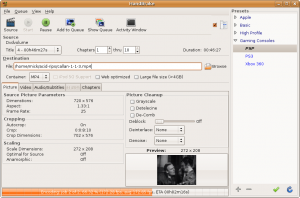
But whilst revisiting my options I discovered that the latest version of handbrake (0.9.4) now has a rather nice GUI and it will rip and encode to formats usable by both the PSP and a variety of other hand-held devices (notably apple’s iphone and ipod thingies) quite quickly and efficiently. Unfortunately for me, the latest version is only available as a .deb for ubuntu 9.10 and I am still using 8.04 LTS (because it suits me). A quick search for alternative builds led me to the ppa site for handbrake which gives builds up to version 0.9.3 for my version of ubuntu. See below:

image of handbrake gui

This version works so well on my system that I no longer have to use my mencoder script.

16 is so much safer than 10

Monday, March 15th, 2010

I am indebted to a colleague of mine (thank you David) for drawing this to my attention.

The Symantec Norton SystemWorks 2002 Professional Edition manual says:

“About hexadecimal values – Wipe Info uses hexadecimal values to wipe files. This provides more security than wiping with decimal values.”

I suppose octal or (worse) binary, just won’t cut the mustard.

plug instability

Sunday, March 7th, 2010

I’m still having a variety of problems with my sheevaplug. Not least of which is the fact that SDHC cards don’t seem to be the best choice of boot medium. I have had failures with two cards now and some searching of the various on-line fora suggests that I am not alone here. In particular, SD cards seem to suffer badly under the read/write load that is routine for an OS writing log files – let alone one running a file or web server. I have also had several failures with my external USB drive. It seems that the plug boots too quickly for the USB subsystem to initialise properly. This means that there is not enough time for the relevant device file (/dev/sda1 in my case) to appear before /etc/fstab is read to mount the drive. A posting on the plugcomputer.org forum suggested a useful workaround (essentially introducing a wait), but even that was only partially sucessful. Sometimes it worked, sometimes it didn’t. In fact, the USB drive still often fails after a random (and short) time and then remounts read-only. Attempts to then remount the drive manually (after a umount) result in failure with the error message “mount: special device /dev/sda1 does not exist”.

In my attempts to cure both the booting problems and the USB connection failures I have installed the latest uboot (3.4.27 with pingtoo patches linked to from Martin’s site) and updated my lenny kernel to Martin’s 2.6.32-2-kirkwood in the (vain as it turns out) hope that the latest software would help. Here I also discovered another annoying problem – installing the latest kernel does not result in a new kernel image, the plug still boots into the old kernel until you run “flash-kernel”. Fortunately this is reasonably well known and is covered in Martin’s troubleshooting page.

I will persevere for perhaps another week with the current plug configuration. If I can’t get a stable system though I will try installing to USB drive (perverse as that may seem) and changing the uboot to boot from that rather than the flaky SD card. Most on-line advice suggests that USB support in uboot is rather “immature”, but it can’t be any worse than the current setup. My thinking is that if I can introduce a delay in the boot process by uboot so that I can successfully boot from an external HDD, the drive connection might then be stable enough to be usable.

Of course I could be completely wrong.