Archive for the ‘electronics’ Category

unplugged

Tuesday, March 30th, 2010

My earlier problems with the sheevaplug all seem to have stemmed from the fact that I had installed Lenny to SDHC cards. As I mentioned in my post of 7 March, I burned through two cards before eventually giving up and trying a new installation to USB disk. This seems to have fixed the problem and my plug is now stable. I had a series of problems with the SD cards I used (class 4 SDHC 8 GB cards) which may have been related to the quality of the cards I used. Firstly the root filesystem would often appear as readonly and the USB drive holding my apt-mirror (mounted as /home2) would similarly appear to be mounted read-only. This seemed to occur about every other day and suggested to me that the plug had seen a problem of some kind and rebooted. But of course since the filesystem was not writeable, there were no logs available to help my investigations.

I persevered for around two weeks during which time I completely rebuilt both the original SD card and another with Martin’s tarball, reflashed uboot with the latest from his site, and reset the uboot environment to the factory defaults before trying again. I also changed /etc/fstab to take out the “errors=remount-ro” entry against the root filesystem, and reduced the number of writes to the card by adding “noatime, commit=180″ in the hope that I could a) gain stability, and b) find out what was going wrong. No joy. I still came home to a plug with a /home2 that was either unmounted or completely unreadable or mounted RO. The disk checked out fine on another machine and I could find nothing obvious in the logs to suggest why the damned thing was failing in the first place. Martin’s site says that “USB support in u-boot is quite flaky”. My view is somewhat stronger than that, particularly when the plug boots from another device and then attaches a USB disk.

But I don’t give up easily. After getting nowhere with the SDHC card installation from Martin’s tarball, I reset the uboot environment on the plug to the factory default (again) and then ran a network installation of squeeze to a 1TB USB disk (following Martin’s howto). It took me two attempts (I hit the bug in the partitioner on the first installation) but I now have a stable plug running squeeze. It is worth noting here that I had to modify the uboot “bootcmd” environment variable to include a reset (as Martin suggests may be necessary) so that the plug will continue to retry after a boot failure until it eventually loads. The relevant line should read:

setenv bootcmd ‘setenv bootargs $(bootargs_console); run bootcmd_usb; bootm 0×00800000 0×01100000; reset’

The plug now boots successfully every second or third attempt. So far it has been up just over ten days now without any of the earlier problems recurring.

My experience appears not to be all that unusual. There has been some considerable discussion on the debian-arm list of late about problems with installation to SDHC cards. Most commentators conclude that wear levelling on the cards (particularly cheap ones) may not be very good. SD cards are sold formatted as FAT or FAT32 (depending on the capacity of the card). Modern journalling filesystems such as ext3 on linux result in much higher read/write rates and the quality of the cards becomes a much greater concern. Perhaps my cards just weren’t good enough.

plug instability

Sunday, March 7th, 2010

I’m still having a variety of problems with my sheevaplug. Not least of which is the fact that SDHC cards don’t seem to be the best choice of boot medium. I have had failures with two cards now and some searching of the various on-line fora suggests that I am not alone here. In particular, SD cards seem to suffer badly under the read/write load that is routine for an OS writing log files – let alone one running a file or web server. I have also had several failures with my external USB drive. It seems that the plug boots too quickly for the USB subsystem to initialise properly. This means that there is not enough time for the relevant device file (/dev/sda1 in my case) to appear before /etc/fstab is read to mount the drive. A posting on the plugcomputer.org forum suggested a useful workaround (essentially introducing a wait), but even that was only partially sucessful. Sometimes it worked, sometimes it didn’t. In fact, the USB drive still often fails after a random (and short) time and then remounts read-only. Attempts to then remount the drive manually (after a umount) result in failure with the error message “mount: special device /dev/sda1 does not exist”.

In my attempts to cure both the booting problems and the USB connection failures I have installed the latest uboot (3.4.27 with pingtoo patches linked to from Martin’s site) and updated my lenny kernel to Martin’s 2.6.32-2-kirkwood in the (vain as it turns out) hope that the latest software would help. Here I also discovered another annoying problem – installing the latest kernel does not result in a new kernel image, the plug still boots into the old kernel until you run “flash-kernel”. Fortunately this is reasonably well known and is covered in Martin’s troubleshooting page.

I will persevere for perhaps another week with the current plug configuration. If I can’t get a stable system though I will try installing to USB drive (perverse as that may seem) and changing the uboot to boot from that rather than the flaky SD card. Most on-line advice suggests that USB support in uboot is rather “immature”, but it can’t be any worse than the current setup. My thinking is that if I can introduce a delay in the boot process by uboot so that I can successfully boot from an external HDD, the drive connection might then be stable enough to be usable.

Of course I could be completely wrong.

from slug to plug

Sunday, February 28th, 2010

Well this took rather longer than expected. I intended to write about my latest toy much earlier than this, but several things got in the way – more of which later.

About three or four weeks ago I bought myself a new sheevaplug.

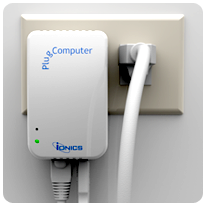
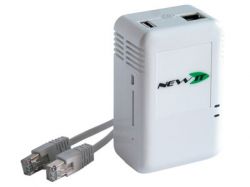
image of sheevaplug

The plug has been on sale in the US for some time, but UK shipping costs added significantly to $99 US retail price. Recently however, a UK supplier (Newit) has started stocking and selling the plugs over here – and at very good prices too. My plug arrived within three days of order and I can thoroughly recommend Newit. The owner, one Jason King no less (fans of 1970′s TV will recognise the name), kept me informed of progress from the time I placed the order to the time it was shipped. He even took the trouble to email me after shipping to check that I had received it OK. Nice touch, even if it was automated.

Looking much like a standard “wall wart” power supply typically attached to an external disk, the plug is actually quite chunky, but it will still fit comfortably in the palm of your hand. Inside that little box though there is enough computing power to make a slug owner more than happy. The processor is a 1.2 GHz Marvell Kirkwood ARM-compatible device and it is coupled with 512MB SDRAM and 512MB Flash memory. Compare that to the poor old slug’s 266 MHz processor and 32 MB of flash and you can see why I’d be interested – particularly since the plug can run debian (and Martin Michlmayr has again provided a tarball and instructions to help you out.

The plugs come in a variety of flavours, but all offer at least one USB 2.0 port, a mini usb serial port, gigabit ethernet and an SDHC slot. This means that debian (or another debian based OS such as Ubuntu) can be installed either to the internal flash or to one of the external storage media available. Newit ship the plugs in various configurations and will happily sell you a device fully prepared with debian (either Lenny or Squeeze according to your taste) on SD card to go with the standard Ubuntu 9.04 in flash. Personally I chose to install debian myself, so I bought the base model. (No, I’m not a cheapskate, I just prefer to play. Where’s the fun in buying stuff that “just works”?)

Given that Martin’s instructions suggest that installing to USB disk can be problematic, and that I have debian lenny on my slugs (and had a spare 4 Gig SDHC card lying around) I chose to use his tarball to install lenny to my SDHC card. Firstly I formatted the card (via a a USB mounted card reader) as below:

/dev/sdb1 512 Meg bootable
/dev/sdb2 2.25 Gig
/dev/sdb3 1024 Meg swap

(note that the plug will see these devices as “/dev/mmcblk0pX” when the card is loaded. The “/dev/sdbX” layout simply reflects the fact that I was using a USB mounted card reader on my PC. )

I then downloaded and installed Martin’s lenny tarball to the newly formatted card and as instructed edited the /etc/fstab to match my installation. Martin’s fstab file is below:

# /etc/fstab: static file system information.
#
#
proc /proc proc defaults 0 0
# Boot from USB:
/dev/sda2 / ext2 errors=remount-ro 0 1
/dev/sda1 /boot ext2 defaults 0 1
/dev/sda3 none swap sw 0 0
# Boot from SD/MMC:
#/dev/mmcblk0p2 / ext2 errors=remount-ro 0 1
#/dev/mmcblk0p1 boot ext2 defaults 0 1
#/dev/mmcblk0p3 none swap sw 0 0

As you can see it defaults to assuming a USB attached device. You need to comment out the USB boot entries and uncomment the SD/MMC entries if. like me, you are intending to boot from SD card. At this stage I also edited “/etc/network/interfaces” to change the eth0 interface from dhcp to static (to suit my network) and I changed “/etc/resolv.conf” because the default includes references to cyrius.com and a local IP address for DNS.

Before we can boot from the SD card, we have to make a few changes to the uboot boot loader configuration to stop it using the default OS on internal flash (where the factory installed Ubuntu resides). Again, Martin’s instructions are helpful here but he points to the openplug.org wiki for instructions in setting up the necessary serial connection to the plug. On my PC (running Ubuntu 8.04 LTS) I got no ttyUSB devices by default and “modprobe usbserial” did not work but “modprobe ftdi_sio vendor=0x9e88 product=0x9e8f” did work for me.

Now open a TTY session using cu thusly “cu -s 115200 -l /dev/ttyUSB1” – don’t use putty on linux, it doesn’t allow cut and paste which can be very useful if you are following on-line instructions (of course it helps if you cut and paste the right instructions). I found that booting is too fast if you have to switch on the plug and then return to a keyboard so I recommend simply leaving the terminal session open and resetting the plug with a pin or paper clip. Hit any key to interrupt the boot session, then follow Martin’s instructions for editing the uboot environment.

My plug was running v 3.4.16 of uboot, so at first I used version 3.4.27 (downloaded from plugcomputer.org) and loaded that via tftp as described by Martin, But this turmed out to be a mistake because my plug failed to boot thereafter. I got the following error message via the serial console:

## Booting image at 00400000 …
Image Name: Debian kernel
Created: 2009-11-23 17:25:02 UTC
Image Type: ARM Linux Kernel Image (uncompressed)
Data Size: 1820320 Bytes = 1.7 MB
Load Address: 00008000
Entry Point: 00008000
Verifying Checksum … Bad Data CRC

Some searching suggested that the uboot image was probably the problem and that reverting to v3.4.19 would solve this. So I downloaded 3.4.19 from “vioan’s” post “#6 on: November 16, 2009, 03:21:34 PM” at the plugcomputer.org forum and reflashed the plug with that image. Success – my plug now booted into debian lenny. Tidy up, update the OS and add a normal user as recommended and we’re ready to go.

My plug was intended to replace the slug I was using as my local apt-mirror. That mirror is now fairly large because I have a mix of 32 and 64 bit ubuntus (of varying vintages) and 386 and ARM versions of debian. I therefore recycled an unused 500 gig lacie USB disk and mounted that as /home2 (originally as /home, but I soon changed that when I wanted to unmount it frequently and then lost my home directory….) Copying the apt-mirror (175 Gig) over the network from my old slug was clearly going to take forever – high speed networking is not the slug’s forte, so I mounted both the slug and the plug’s disks locally on my PC and copied the files over USB – much faster. It was here that I discovered why the old lacie disk (a “designed by porsche” aluminium coated beast) was lying idle. I’d forgotten that it sounded like a harrier jump jet on take off when in use. I put up with that for a week – just long enough to get me to a free weekend when I could rebuild the old slug (now used as just an NTP server and the webcam) to boot from a 4 gig USB stick so that I could recycle its disk onto the plug. I’ve just finished doing that.

One other problem I found with the plug which caused me much head scratching (and delayed my writing this as I noted above) was that it consistently failed to boot back into my debian install after a “reboot” or “shutdown -r” – I had to power cycle the device to get it to boot properly. I spent some time this weekend with the serial port connected before I noticed (using “printenv” at the uboot prompt) that I had mixed up the uboot environment variables printed on Martin’s site. I had actually copied part of the instructions for the USB boot variant instead of the correct ones for the SD card boot. Sometimes “cut and paste” can be a mistake.

a thirteen amp plug just won’t cut it

Monday, March 16th, 2009

I normally read the register for its IT tech related reporting – and I enjoy it just because it is a wonderfully scurrilous rag. However, an article about the Swedish supercar maker Koenigsegg’s “Quant”, which el Reg chose to call “Mary”, piqued my interest somewhat. I can’t quite make the arithmetic work out. To quote the article:

“The Mary has a top speed of 275kph (171mph), a 0-62 time of 5.2 seconds, a range of 500km (312 miles) and is powered by two electric motors pumping out a combined 512bhp (381kW) of power and 715nm (527lb ft) of torque.

While Koenigsegg is shy on exact technical details, its press release abounds with interesting ‘facts’ – including the claim that that it will be possible to charge the Mary’s NLV-developed “redox FAES (Flow Accumulator Energy Storage) to full capacity in 20 minutes and give the vehicle a range of 500 kilometres”.”

Now we if we unpick that a bit we get the following:

- the car uses 381kW of power at peak – let’s say a maximum 200kW at a sensible cruising speed of 100 kph.
- it can travel for 500 kilometers on one charge.
- it can be charged to capacity in 20 minutes.

Now 500 kilometers at 100 kph is 5 hours travel. Multiply that by 200kW and we get 1000kWh. But it can be charged in 20 minutes, so the charge rate must be three times that – i.e. 3000kWh.

No way can you get that through a 13 amp socket.

vinyl to digital

Thursday, January 4th, 2007

Recently you may have seen adverts in a wide variety of publications for a USB turntable. This product is aimed at people (like me) who have a collection of old vinyl recordings but no longer have the means to play them as they have moved to CD and/or digital recordings. Most of the turntables I have seen are priced at around £110. You don’t need to spend that much. And you certainly don’t need USB connectivity. Any turntable which includes its own pre-amp will do (but the pre-amp is necessary, it is no good buying a turntable without one). I bought one made by Bush for less than £50.00 – I’m sure a conversation with your local audio supplier will unearth others.

Once you have the turntable you can easily connect it to your existing HiFi and rediscover the joys of your old vinyl. But the best bit (and this is where the pre-amp comes into use) is that you can plug the turntable directly into the line-in jack on the sound card of your PC and record to disk for conversion to digital format (MP3 if you must, but OGG vorbis for preference). The key to this magic is a nice piece of open source software called Audacity. If, like me, you run Linux, then you can probably simply install the package supplied with your chosen distro, If your distro doesn’t provide it by default, then the website has pre-built packages for most of the popular distros. You can, of course, build from source if you wish. Audacity is cross platform and is available for Windows users. Windows users can then discover the power of free, open source software

Give it a try.

Mike Harrison

Tuesday, December 26th, 2006

I admire the offbeat, the unusual, and the plain weird. I came across Mike Harrison’s site when I was looking for information about Tesla Coils. It is well worth a visit – I mean the man collects thermionic valves such as this:

eimac.jpg

A bit bigger than a transistor