Archive for the ‘multimedia’ Category

google buys advertising

Wednesday, November 23rd, 2011

In an interesting reverse of the norm, google paid for three full page adverts in the guardian a couple of days ago. Today there is yet another full page ad in the same paper. I assume they have run similar campaigns in other UK newspapers over the past few days, The ads are quite intriguing in that they seem to be addressing potential concerns about the use of well established web technologies. Today’s ad, for example, was about cookies. Each ad points to a google site giving further detail.

These adverts cannot have been cheap. What are they worried about?

webcam mark II

Tuesday, September 27th, 2011

Upgrading the slugs to squeeze killed the webcam. At first I thought that squeeze was missing the necessary gspca drivers, but no, a quick look in /dev revealed an entry for video0 and “lsmod” reported “gspca_zc3xx” loaded correctly. This is a different driver to that which my camera loaded in lenny (spca5xx) but a quick search around the web confirmed that the camera should be happy with the new driver. So clearly the webcam program itself was at fault (confirmed by checking the output when running the program by hand). Time to find an alternative.

A scan of the debian repositories turned up a bunch of possibilities, some of which I had looked at in the past when first installing the camera. I eventually plumped for fswebcam because it was quick and easy to install and configure, it seemed to be actively supported (unlike Gerd Knorr’s old program) and it didn’t need a GUI. More to the point, it works with my old Logitech camera.

The program can be run from the command line with option switches or configured to read its options from a config file. And despite being advertised as a tiny, it has quite a rich feature set. It can even perform simple manipulation of the captured image, such as resizing, averaging multiple frames or overlaying a caption on the image. Nifty.

My current config file is shown below as an example. I may change this because I’m not quite happy with the brightness/contrast mixture and I’m still playing with the options available. Still, a recommended package.

# /etc/fswebcam.conf
#
# config file for fswebcam utility
#
# device and input are defaults
device /dev/video0
input 0
# log messages – only use this is debugging setup
# log /var/log/fswebcam.log
# repeat image capture every 30 seconds
loop 30
# set number of frames to skip if the camera sends bad frames on startup.
# Note – this is only necessary when using the camera for video capture
# skip 10
# background the webcam process
background
# set resolution of image (default is 384 x 288)
resolution 320X240
# set the palette to use in the output format (here JPEG) and the jpeg quality
# (my camera doesn’t like this option so it is commented out)
# palette JPEG
jpeg 95
# set some additional controls
# (use “fswebcam -d v4l2:/dev/video0 –list-controls” to see options)
set brightness=55%
set contrast=40%
# place the banner at the bottom of the image (default)
bottom-banner
# and colour it black
banner-colour #000000
# set the font to use in the banner title and timestamp
font /usr/share/fonts/truetype/msttcorefonts/arialbd.ttf
# set the title and timestamp to display in the banner – (timestamp uses strftime format)
title “Webcam on the Slug”
timestamp “%d %B %Y at %H:%M:%S”
# where we save the image
save /home/web/webcam.baldric.net/images/webcam.jpeg
#
# end

my wife bought me a kindle

Sunday, August 14th, 2011

I feel it only right to add to the post below by noting that my wife bought me a Kindle for my birthday. I have since found one useful aspect to electronic publishing. A Kindle can reduce the weight of your luggage when going on holiday.

But I still prefer the “real thing”.

"speedbump" cartoon by Dave Coverly

Speedbump” cartoon copyright Dave Coverly.

in praise of dead trees

Sunday, August 14th, 2011

As an unashamed gadget freak I suppose I should applaud the rise of the e-book in all its wondrous forms. But actually I much prefer the “real thing” (TM). Some while back I became involved in a series of email exchanges about e-books in general and the Amazon Kindle in particular. That exchange made me think about what it is that I like so much about books. I have no idea exactly how many books I have dotted around the house, but I’d guess the number is somewhere north of a couple of thousand, many of which I have read more than once. Someone on the mail list discussion pointed out that I could probably get that entire collection on one Kindle, a thought that, frankly, horrified me.

I like books. I like the fact that I can lend them to people, I like the fact that I can read them in the bath, drop them when I nod off, and know that they are still (just) readable afterwards. I like way that they are actually objects of beauty in their own right, independent of the contents (can you imagine a bookshelf full of Kindles?). I like the fact that the words remain the same between me putting the book down and picking it up again. I like the fact that when I have bought a book, I can be sure that both the book and the original words will still actually /be/ there when I next pick it up (that may not always be the case for electronic words. In fact Amazon themselves very famously shot themselves in the foot when they deleted customers copies of 1984 and Animal Farm back in July 2009).

A real life book doesn’t need batteries, and it will (probably) still be readable in several hundred years when no-one on earth will still have a Kindle. Books can be given as gifts to a friend. That gift can contain a flyleaf note personalising the book in a very special way (I have duplicates of some books simply because a close friend or family member has given me an inscribed copy of a book that I already possess. Such gifts from my kids are beyond price.) E-mailing a friend an electronic book somehow doesn’t have the same aesthetic.

I like the fact that you can scribble in the margins. Many of my books (particularly the text books or reference books) have such marginal notes. Yes I know you can do that with a Kindle, but it somehow doesn’t seem the same as coming across a note you made to yourself 40 years ago whilst you were boning up on a new topic.

I like old bookshops and market stalls selling books. I can happily spend much time browsing shelves for old SF pulp from the 40s and 50s. Time I would probably otherwise be wasting on something entirely frivolous. Sure I could probably find what I wanted by electronically searching on-line, but where’s the fun in that? I’d miss the serendipity of stumbling across a previously unread author. And there would be no bookseller to chat to who could recommend similar books to the ones I had just picked up.

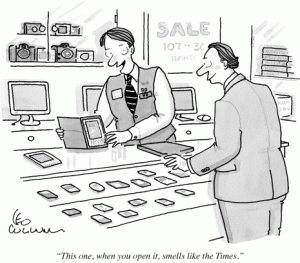
Oh and I like the way old books feel and smell.

cartoon of man buying e-book

Cartoon from the New Yorker dated 14 September 2009. Copyright is fully acknowledged.

kseniya simonova

Saturday, September 4th, 2010

This has absolutely nothing to do with my usual topics but I make no apology for posting this because the artistry is stunningly beautiful. I was sent a link to Kseniya Simonova’s sand art by a correspondent on a mailing list I subscribe to. Apparently the artist is telling the story of a ukrainian family before, during and after the bombing of their town in the second world war.

I understand that Ms Simonova was a contestant on Ukraine’s version of “Britain’s got talent”. This lady has real talent, unlike some of the contestants I have seen on the UK’s version. It looks as if Ukrainian television may be in a better place than ITV.

psp video revisited

Sunday, March 21st, 2010

I last posted about ripping DVDs to PSP format back in November 2007. Since then I have used a variety of different mechanisms to transcode my DVDs to the MP4 format preferred by my PSP. A couple of years ago I experimented with both winff and a command line front end to ffmpeg called handbrake. Neither were really as successful as I would have liked (though winff has improved over the past few years) so I usually fell back to the mencoder script that works for 95% of all the DVDs I buy.

I have continually upgraded the firmware on my PSP since 2007 so that I am now running version 6.20 (the latest as at today’s date). Somewhere between version 3.72 and now, sony decided to stop being so bloody minded about the format of video they were prepared to allow to run on the PSP. We are still effectively limited to mpeg-4/h.264 video wth AAC audio in an mp4 container, but the range of encoding bitrates and video resolutions is no longer as strictly limited as it was back in late 2007. So when going about converting all the DVDs I received for christmas and my last birthday and considering whether I should I move my viewing habits to take advantage of the power of my N900, I recently revisited my transcoding options.

Despite the attractiveness of the N900′s media player I concluded that it still makes sense to use the PSP for several reasons:- it works; the battery lasts for around 7 hours between charges; I have a huge investment in videos encoded to run on it; and most importantly, not using the the N900 as intensively as I use the PSP means that I know that my ‘phone will be charged enough to use as a ‘phone should I need it.

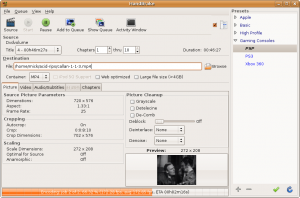
But whilst revisiting my options I discovered that the latest version of handbrake (0.9.4) now has a rather nice GUI and it will rip and encode to formats usable by both the PSP and a variety of other hand-held devices (notably apple’s iphone and ipod thingies) quite quickly and efficiently. Unfortunately for me, the latest version is only available as a .deb for ubuntu 9.10 and I am still using 8.04 LTS (because it suits me). A quick search for alternative builds led me to the ppa site for handbrake which gives builds up to version 0.9.3 for my version of ubuntu. See below:

image of handbrake gui

This version works so well on my system that I no longer have to use my mencoder script.

shiny!

Wednesday, December 30th, 2009

Well I finally cracked and ordered an N900 on-line just before Christmas. Nokia had been promising since about August of this year that the device “might” ship in the UK around October. Since then, the release date has slipped, and slipped, and slipped (much to the amusement of an iPhone using friend of mine who predicted exactly that back in August). Every time I read about a new impending release date I checked with the major independent retailers only to be told “no, not yet, maybe next month”.

Many review sites are now saying that Vodafone and T-Mobile will both be shipping the N900 on contract in January. Well, not according to the local retail outlets for those networks they won’t. And besides, I had no intention of locking myself in to a two year contract at around £35-£40 pcm, particularly if the network provider chose to mess about with the device in order to “customise” it. So, as I say, I cracked and ordered one on-line, unlocked and SIM free on 21 December. It arrived yesterday, which is pretty good considering the Christmas holiday period intervened.

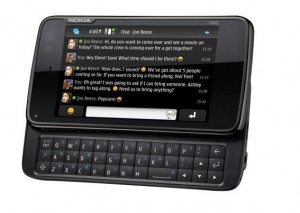
nokia n900

nokia n900

So what is it like?

Well, there is a pretty good (if somewhat biased) technical description on the Nokia Maemo site itself, and that site also has a pretty good gallery of images of the beast so I recommend interested readers start there. There are also a number of (sometimes breathless) reviews scattered around the net, use your search engine of choice to find some. I won’t attempt to add much to that canon here. Suffice to say that I am a gadget freak and a fan of all things linux and open source. This device is a powerful, hand held ARM computer with telephony capability – and it runs a Debian derivative of linux. What more could you ask for?

Tap the screen to open the x-terminal and you drop in to a busybox shell.

busybox shell on the N900

busybox shell on the N900

Oh the joy!

So – first things first. Add the “Maemo Extras” catalogue to the application manager menu, then Install openSSH, add a root password and also install “sudo gainroot”. Stuff you Apple, I’ve got a proper smartphone (and, moreover, one which is unlikely to be hit by an SSH bot because a) I have added my own root password, and b) I have moved the SSH daemon to a non-standard port – just because I can). Now I can connect to my N900 from my desktop, but more importantly from my N900 to my other systems. Next on the agenda is the addition of OpenVPN so that I can connect back to my home network from outside. Having the power and portability of the N900 means that even my netbook is looking redundant as a mobile remote access device.

(Oh, and it’s a pretty good ‘phone too, if a little bulky).

[ update posted 16 March 2010 - This review at engadget.com is in my view well balanced and accurate. I have now had around three months usage from my N900 and I love its power and internet connectivity, but I have found myself carrying my old 6500 slide for use as a phone. I agree with engadget that the N900 is a work in progress. If I were designing a successor (N910?) personally I'd drop the keyboard (which I hardly ever use in practice) and save weight and thickness. ]

apple antipathy may be misplaced

Sunday, November 29th, 2009

Apparently the lastest release of the iPhone OS (v 3.1) has caused a few minor problems with WiFi and battery life. This has led El Reg to moan about the fact that you can’t downgrade the iPhone OS to an earlier version. I’m no great fan of Apple, but to be fair, this situation is not unique to them. Each time I update my PSP to the latest software release, I receive a warning that I cannot revert to the earlier version after upgrade. Not being an iPhone user, I don’t know whether you get a similar warning from Apple before the upgrade or not. But that aside, it does not strike me as unreasonable that Apple should prefer you to keep your OS as current as possible. Software upgrades are generally designed to fix bugs and/or introduce new features. If a particular upgrade has problems, then I would expect the supplier to fix those problems with a new release or a service pack. I would not expect them to recommend that you downgrade.

psp hardware and software specs

Sunday, January 13th, 2008

I have just stumbled upon a very good resource listing specifications of the hardware and software revisions for the PSP. I would have found this site most useful when I was researching how to format video for the psp last year.

The site is at www.edepot.com/reviews_sony_psp.html

if Microsoft made the iPhone

Friday, November 30th, 2007

I’m sorry. I know I really shouldn’t do this, but I loved this so much I watched it three times in succession. It’s vicious, it really is. And best of all, it was apparently made on a Mac.