Archive for the ‘networks and networking’ Category

tor on a vps

Sunday, July 5th, 2009

I value my privacy – and I dislike the increasing tendency of every commercial website under the sun to attempt to track and/or profile me. Yes, I know all the arguments in favour of advertising, and well targeted advertising at that, but I get tired of the Amazon style approach which assumes that just because I once bought a book about subject X, I would also like another book about almost the same subject. I don’t much like commercial organisations profiling me (and, incidentally, I find it highly ironic that we in the UK seem to make a much bigger fuss about potential “big brother” Government than we do about commercial data aggregation, but hey).

Sure, I routinely bin cookies, block adware and irritating pop up scripts, and use all the, now almost essential, firefox privacy plugins, but even there we still have a problem. I don’t know who wrote those plugins, I just have to trust them. That worries me. Some of the best known search engines are even more scary if you think carefully about the aggregate information they have about you.

Sometimes I care about the footprint I leave, sometimes I don’t, but the point is that I should be in control of that footprint. Increasingly that is becoming difficult. Besides being tracked by sites I visit, last year’s controversy about BT’s use of phorm is also worrying. If my ISP can track everything I do, then I face another level of difficulty in protecting my fast vanishing privacy.

Besides using a locked down browser, DNS filtering which blocks adware, cutting cookies and all the other tedious precautions I now feel are necessary to make me feel comfortable, I often use anonymous proxies when I don’t want the end site to know where I came from. But even that now looks problematic. If you use a single anonymising proxy, all you are doing is shifting the knowledge about your browsing from the end site to an interrmediary. That intermediary may (indeed should) have a very strict security policy. Ideally, it should log absolutely nothing about transit traffic. But if that intermediary does log traffic data and then sells that data to a third party, you may be in an even worse position than if you had not attempted to become anonymous. Back in january of this year, Hal Roberts of Harvard University, posted a blog item about GIFC selling user data. If sites such as Dynaweb are prepared to sell user data, then the future for true anonymity looks problematic. As Doc Searle said in this blog posting,

We live in a time when personalized advertising is legitimized on the supply side. (It has no demand side, other than the media who get paid to place it.) Worse, there’s a kind of gold rush going on. Even in a crapped economy, a torrent of money is flowing into online advertising of all kinds, including the “personalized” sort. No surprise that companies in the business of fighting great evils rationalize the committing of lesser ones. I’m sure they do it it the usual way: It’s just advertsing! And it’s personalized, so it’s good for you!

No, as Searle well knows, it is not good for you.

What to do? Enter tor and privoxy.

I first used tor some years ago in its earlier incarnation as “the onion router” (hence its name) and until recently had used it only sporadically since. The main drawback of the early tor network was its speed, or lack of it. Tor gets is strength (anonymity) from the way it routes traffic.

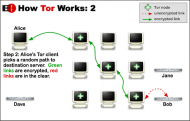
how tor works

Tor traffic passes through a series of nodes before exiting at a node which cannot be linked back to the original source. So tor performance depends on a large number of both fast intermediate relays and a large number of exit nodes. Since not all tor users are prepared to run relays, let alone an exit node (it can be bandwidth expensive and in the case of an exit node can lead to your system being mistaken for a hostile, or compromised, site) tor can be slow, at times painfully slow. But recently tor has been getting faster as more relay and exit nodes are added. It is now at a state which is probably usable most of the time, so long as you are prepared to wait a little longer than is customary for some web pages to load (and you don’t use youtube…..).

When using tor recently I have tended to follow the well trodden path of local installation alongside privoxy. Because I believe in giving something back to the community if I am gaining benefit, I also set my local configuration to run as a relay. But that caused some difficulty. If we assume that my tor usage was fairly representative of the majority of tor users out there, then the fact that my relay was only operational when my client system was up and running meant that the relay would be seen by the tor network as unstable and probably slow, Indeed, the fact that I had to throttle tor usage to the minimum to stop the network from impacting unduly on my ADSL bandwidth, meant that I was not entirely happy with the setup. So I stopped relaying. But that leaves me feeling that I am taking advantage of a free good when I could be contributing to that good.

Some while back I bought myself a VPS from Bytemark (an excellent, technically savvy, UK based hosting company) to run a couple of webs and an MTA. I use it now largely as a mail server (running postfix and dovecot) and the traffic is relatively low volume. That VPS is pretty small (though actually way better specced than some real servers I have run in the past) but I reasoned that I could easily run a tor relay on that machine and then connect to it remotely from my client system. I did, and it worked fine. But I soon found that the tor network seems to have a voracious appettite for bandwidth, Even with a fairly strict exit policy (no torrents allowed!) and some tight bandwidth shaping, I still found that I was using about 2 Gig of traffic per day (vnstat is useful here). Any more than that would start to encroach on my bandwidth allowance for my VPS and possibly impact on the main business use of that server. Monthly rates for VPSs are now less than I pay for my mobile phone contract (and arguably more useful than a phone contract too) so I decided to specialise and buy another VPS just for tor. I now run an exit node on a VPS with 384 MB of RAM and 150 Gig monthly traffic allowance. That server is currently throttled to about 2 Gig of traffic per day, but I will double that very shortly.

Now one of the nicest things about running a tor relay is the fact that your own tor usage is masked and you may get better anonymity. I therefore run privoxy on my tor relay and proxy through from my client to that proxy which in turn chains to tor internally on my relay. However, if you simply configure your local client to proxy through to your relay in clear you are allowing your ISP (and anyone else who cares to look) to see your tor requests – not smart. So I tunnel my requests to the tor relay through ssh. My local client has an ssh listener which tunnels tor requests through to the relay and connects to privoxy on port 8118 bound to localhost on the relay. I also have a separate browser on my desktop which has as its proxy the ssh listener on my client system. For a good description of how to do this see tyranix’s howto on the tor wiki site. Now whenever I want to use tor myself I simply switch browser (and that browser is particularly dumb and stripped, and has no plugins or toolbars which could leak information). Of course, should I get really paranoid, I could always run the local browser in a VM on my desktop and reload the VM after each session.

But I’m not that paranoid.

upgrading the slug – a lesson in addresses

Sunday, March 1st, 2009

My ever growing DVD collection has been taking its toll on my disk storage. Despite the fact that ripping a DVD to PSP format typically shrinks it to between 300 and 500 MB, that still means that I have over 300 GB of videos on my PC. Add to that the OGG vorbis audio collection of my ripped CDs and the usual collection of photos and other critical data that I back up to the slug and I was getting perilously close the 500 GB limit of the attached USB disk. Time for an upgrade.

ITB disks are now appearing on the market at well under £100.00. Ebuyer are currently selling 1TB Toshiba external disks for an astonishing £69.00 inc VAT, but there were none actually in stock this weekend. Fortunately I managed to source exactly the same disk from a local supplier for only a few pounds more than the ebuyer price. Times certainly are hard. I doubt that he made much of a margin on the sale. But it made me happy and he knows I’ll go back there again.

Since I originally built my slugs last year, Debian Lenny has moved from testing to stable, and the latest Debian installer from slug-firmware.net is now “Debian/NSLU2 (armel) 5.0 Stable”. For a while the installer was available in two flavours for the ARM architecture used by the slugs.. The old ARM port was called “arm”, whilst the new ARM port using the EABI (see wiki.debian.org/ArmEabiPort) is called “armel”. This port supposedly offers better support for floating point and other features. Both the arm and armel architectures are supported for Lenny (now Debian 5.0) but according to Martin Michlmayr the old arm port will be dropped after this release. So, it looks as if an OS upgrade is necessary now anyway. Unfortunately, there seems to be no easy upgrade path from arm to armel, so a reflash was in order. This took me rather longer than I had anticipated because of a stupid mistake on my part. Lesson – always document any changes you make – even on a small network……

Martin has updated his excellent installation notes to cover both the new image and the installer itself. In that note he says that the installation should take around four hours. Well mine took nearer to six because I couldn’t connect to the damned slug after reflashing with upslug2. The IP address I had previously been using on the slug wouldn’t respond at all. I tried reflashing again, then reflashing with the original Linksys image in the hope that I could then connect to the default Linksys address of 192.168.1.77 and reconfiguring from there Then reflashing again. Nothing worked.

Now, whilst my network is not overly complicated, it is segmented and I use two separate RFC1918 netblocks. I couldn’t recall using the slug on a different netblock to the one I was attempting to install on, but in a “what the hell, it’s worth a try” moment, I unhooked the slug from my internal net and stuck it on a separate switch along with a laptop to test connections. I configured the laptop with my outer net’s address and then ran nmap to scan the entire range hoping to find the slug. No joy,

At this stage I thought that I must have fritzed the slug somehow and was about to give up. But before doing so, I switched back to testing on the original network address – i.e. I reconfigured the laptop to my internal network address range and re-ran nmap. Bingo – up popped the slug. On the same IP address as my main PC on the internal net. I then remembered that I had shuffled some machines around on the internal net and moved from DHCP to static addresses (in a “rationalisation” period a few months back). I had given the slug a new fixed IP address, but had, of course, forgotten that the old IP address would be hard-wired into the slug’s flash memory . The only way you can change this hard-wired address is through the Linksys interface, which of course I was no longer using. My reflash of the slug had removed the IP address I had configured in Debian and left the old, conflicting address, in use. And no, I have no idea why I chose to use the same address for my main PC. A great way to spend a saturday afternoon. Next time, write it all down.

Martin is right though. After the wasted time, the new install took around four hours.

and yet more DNS lunacy

Wednesday, December 24th, 2008

A company called Unified Root is offering to register new top level domains in advance of the proposed ICANN changes. The company describes itself in the following terms: “UnifiedRoot (Unified Root) is an independent, privately owned company, based in Amsterdam, which makes corporate and public top-level domains (TLDs) available worldwide. Through our own efforts and our collaboration with other leaders in the industry, UnifiedRoot (Unified Root) intends to achieve the free-market, user-driven approach to domain names that was one of the leading principles of the founding fathers of the internet. UnifiedRoot (Unified Root) provides a simple, direct, consistent and comprehensive internet addressing system, enabling governments, businesses, ISPs, and individual “www-users” to provide easier, user-friendly access to their information on the Internet. ”

The company operates a website at tldhomepage.com which markets the new TLDs and describes how users may make use of those new TLDs by becoming “unified”. They even have a useful little button marked “UnifymeNow” which will attempt to modify your DNS settings Yep, you guessed it – to use this service, you have to point your DNS resolver at servers owned and managed by UnifiedRoot. Whoop de do! Yet another subversion of DNS by a company outside the internet governance process.

Just out of interest I checked the avaliability of the TLD “.con”. It’s available.

That could be useful.

more DNS silliness

Wednesday, December 24th, 2008

I came across an interesting post on Avert labs site recently. That post pointed to an earlier SANS posting, which in turn, referenced a Symantec discussion of a new Trojan called Trojan.Flush.M. This trojan is an interesting variant of a class of trojans which hijack local DNS settings to force the compromised machine to use a hostile DNS server. The hostile server will then redirect the user to fake sites – usually Banks in an attempt to extract identification and authentication credentials. As the Avert post says, there have been various types of DNS changing tactics employed in the past, but the clever tactic used by this latest trojan is that it subverts the use of DHCP on any network which uses that protocol to manage client system settings. Once the trojan has been installed on a (windows) PC it creates a new service on that PC which allows the machine to send fake DHCP offer packets to any requesting client on the network. The DHCP offer includes the address of a hostile DNS server outside the network. The neat point here is that any client system on the network, regardless of the operating system in use, can then be subverted – and without some network traffic analysis it will be very difficult to find out how the subverted machine was compromised.

But, and this is a big but, the whole attack fails when faced with a properly designed and well managed network. Consider: for the attack to be succesful the subverted client must be able to make DNS requests directly to the hostile server. But no corporate network should allow a client system direct access to the net. All DNS requests should be answered by a local DNS server and that server should be the only machine which is allowed to forward DNS requests to the outside world. Indeed, that server should probably only forward DNS requests to specific servers on the company’s service provider network. The bad news of course, is that any home or SOHO network is unlikely to be well designed and protected.

One of the respondents to the Avert post seems to have missed the point entirely though. He said “All the more reason to consider using trusted third party DNS networks, such as OpenDNS.”. Oh dear, that is so wrong in so many ways. Just think that through will you Jason?

where did my bandwidth go

Wednesday, August 20th, 2008

Have you ever wondered what was eating your network? Would you like to be able to check exactly which application was responsible for that sudden spike in outbound traffic? NetHogs might help. This neat little utility calls itself a “small ‘net top’ tool”, and that is exactly what it is. NetHogs groups bandwidth usage by PID so you can immediately see which application is responsible and take whatever action you deem appropriate.

Recommended.

(Oh, and if you want a nice graphical representation of the connections your PC is making whilst you are using it, I recommend you install etherape. It can be a highly educational (not to say scary) experience to leave etherape running whilst you fire up your browser. You will find that your PC is making HTTP connections all over the place. Now try leaving it running whilst you are not doing anything and watch what happens.)

trusting DNS

Sunday, August 10th, 2008

Dan Kaminsky has (quite rightly) been hitting the press a lot in the weeks since 8 July when he announced the work done to fix a flaw he had discovered in DNS. The vulnerability itself was new, but its impact (cache poisoning) was not. Indeed, we’ve known about the dangers of poisoned DNS caches for some years now. Kaminsky originally took a lot of flak about his announcement, its timing (to coincide with Microsoft’s “patch tuesday”), his reluctance to discuss details (“trust me, it’s dangerous. I’ll tell you all about it later”) and his apparent willingness to “talk up” the issue with the non-specialist press. But all that aside, he deserves immense credit for highlighting the flaw and herding all the cats necessary to get vendors on board to create patches. He has also since been as good as his word and described the problem in detail.

However, I have a big problem with one of his blog entries: “Here comes the cavalry” where he says “Note, if you must forward, it’s most secure to do so to a name server that’s still on your network but happens to be patched — but in a pinch, you’re much better off forwarding to OpenDNS or another free and patched name service provider than going direct (and insecure).”

In my view, this is hugely ironic. Cache poisoning means that you cannot trust the answer your DNS server provides. I do not trust the answer OpenDNS provides. OpenDNS violates principles which in my view are essential to an open, transparent and trustworthy network. They hijack queries and give incorrect answers. For example, they do not reply with NXDOMAIN to a query for a non-existent host or domain. They also hijack queries aimed specifically at Google. See the dig queries below for examples.

I first came across OpenDNS when I installed packetprotector on an Asus wireless router I was playing with. OpenDNS servers were hardwired as the default DNS hosts in that package. I run my own dns internally using DNSmasq and the hosts file on that system contains the private addresses of my internal servers on my network. Imagine my surprise then, when during testing, I pinged one of my internal hosts from the Asus only to get a response back from a server with the address “208.69.34.132″. This should not happen. It is a bad thing (TM), regardless of how OpenDNS may attempt to portray this as “helping” the community.

In a discussion about Google’s toolbar, David Ulevitch of OpenDNS said, “The solution to this problem was to route Google requests through a machine we run to check if the request is a typo or one of your shortcuts. If it is a typo or shortcut then we do what we always do, just fix the typo or launch your shortcut and send you off on your way. If it’s not one of those two things, we pass it on to Google for them to give you search results. This solution provides the best of both worlds: OpenDNS users get back the features that they love and Google continues to operate without problems.”

Wrong. I do not want some third party fiddling with my DNS requests on the spurious grounds that I may have mistyped some hostname.

Make up your own mind. There is extensive discussion about OpenDNS on-line. See in particular the commentary at the scream and on wikipedia. Personally, I prefer to use my ISP’s DNS servers. I have a contractual relationship with them and I can therefore expect them to provide me with a service which works, and is trustworthy (for some definition of “trust”). Oh, and they patched their DNS servers very, very, quickly.

Now some sample dig results:

First using my default (DNSmasq forwarding to my ISP)

mick@slug:~$ dig www.google.com

; <<>> DiG 9.4.2-P1 <<>> www.google.com
;; global options: printcmd
;; Got answer:
;; ->>HEADER<<- opcode: QUERY, status: NOERROR, id: 47551
;; flags: qr rd ra; QUERY: 1, ANSWER: 5, AUTHORITY: 7, ADDITIONAL: 0

;; QUESTION SECTION:
;www.google.com. IN A

;; ANSWER SECTION:
www.google.com. 604798 IN CNAME www.l.google.com.
www.l.google.com. 299 IN A 216.239.59.104
www.l.google.com. 299 IN A 216.239.59.147
www.l.google.com. 299 IN A 216.239.59.99
www.l.google.com. 299 IN A 216.239.59.103

;; AUTHORITY SECTION:
l.google.com. 86397 IN NS e.l.google.com.
l.google.com. 86397 IN NS a.l.google.com.
l.google.com. 86397 IN NS c.l.google.com.
l.google.com. 86397 IN NS d.l.google.com.
l.google.com. 86397 IN NS b.l.google.com.
l.google.com. 86397 IN NS g.l.google.com.
l.google.com. 86397 IN NS f.l.google.com.

;; Query time: 30 msec
;; SERVER: 192.168.10.10#53(192.168.10.10)
;; WHEN: Sat Jul 26 18:03:08 2008
;; MSG SIZE rcvd: 228

Now use openDNS

mick@slug:~$ dig www.google.com @208.67.222.222

; <<>> DiG 9.4.2-P1 <<>> www.google.com @208.67.222.222
;; global options: printcmd
;; Got answer:
;; ->>HEADER<<- opcode: QUERY, status: NOERROR, id: 40840
;; flags: qr rd ra; QUERY: 1, ANSWER: 3, AUTHORITY: 0, ADDITIONAL: 0

;; QUESTION SECTION:
;www.google.com. IN A

;; ANSWER SECTION:
www.google.com. 30 IN CNAME google.navigation.opendns.com.
google.navigation.opendns.com. 30 IN A 208.69.34.230
google.navigation.opendns.com. 30 IN A 208.69.34.231

;; Query time: 19 msec
;; SERVER: 208.67.222.222#53(208.67.222.222)
;; WHEN: Sat Jul 26 18:04:54 2008
;; MSG SIZE rcvd: 104

Are you happy with that? I’m damned if I am.

backtrack 3 released

Friday, June 20th, 2008

Any half decent sysadmin will routinely test the security of his or her own systems. A good, and sensible, sysadmin will follow up those tests with an independent security audit by a professional company – preferably one which is a member of a recognised industry body (such as CREST). Finding the holes in your security mechanisms (and there will be some – probably more than you will be happy about) before the bad guys do is essential if you want to sleep at night (and keep your job).

There are a huge number of security testing tools available for free if you know where to look. Most sysadmins keep a toolbox of their favourites (nmap, nessus, ettercap, dsniff et al.) to hand ready for testing any new build. But it can sometimes be difficult to know just which tool to use, and where to get it. Enter backtack. I first came across this collection of tools as recently as february 2006 and found it an excellent resource. Essentially backtrack is a collection of all the security testing tools you are likely to need packaged into one linux distribution. Think of it as a knoppix for security testing. A complete list of all the tools in the collection can be seen here.

Bactktrack Version 3 has just hit the streets. Get it here.

(Oh, and don’t think that using a toolset like this makes you a pen-tester. It doesn’t. What it might do is make you more security aware, and a better sysadmin.)

ssh through http proxy

Saturday, March 1st, 2008

On a mail list I subscribe to I have recently been involved in a discussion about the restrictions sometimes placed on users of WiFi hotspots or hotel networks (to say nothing of the restrictions placed on corporate networks). Some of the suggested solutions involve tunnelling ssh connections over http(s). Other solutions assume that the network is simply restricting access with packet filters so that you may just need to connect to a non-standard port (such as 80 or 443). If this is the case, then you simply have to configure your target ssh daemon to listen on that port. However, some networks force you through a proxy, in which case you need a utility like corkscrew. I had not previously heard of this neat little utility – but it turns out to merit some exploration if you find yourself needing such a tool.

Corkscrew is relatively simple to set up, but if you have problems, take a look at Andrew Savory’s blog entry of 27 February 2008.

another vulnerability in the home hub

Saturday, January 19th, 2008

The guys at gnucitizen have posted details of another vulnerability in the BT home hub (and related Thomson routers). This vulnerability allows a remote attacker to reconfigure the router using the UPnP functionality which is turned on by default. UPnP is an authenticationless protocol designed to allow local devices to reconfigure the router – typically to allow insertion of port forwarding rules or similar changes to the firewall. On the Thomson routers (and the home hub) UPnP configuration can be found under “Game and Application Sharing” on the web configuration interface.

If you haven’t already done so, I recommend that you turn off UPnP. There is no good reason to leave it on. If you find that some device on your network needs a particular port forwarding rule to be set, then set it manually. Better still, consider whether you really need that device on your network.

reflashing the BT home hub from a linux PC

Sunday, December 30th, 2007

As I mentioned in an earlier post, I found several references to successful reflashes of the BT hub to a genuine Thomson 7G image on a variety of sites. None of those sites gave instructions as to how to do this if you run a linux PC.

So I have documented how I did it here.