
For some time mow I have been increasingly fed up with the poor service offered by SMS on my mobile phone. I’m not a hugely prolific sender of text messages, and those I do send are primarily aimed at my wife and kids, but when I do send them, I expect them to get there, …
Category: privacy and anonymity
Permanent link to this article: https://baldric.net/2016/03/30/jibber-jabber/
Jan 24 2016
guest network
Last month Troy Hunt posted an interesting comment on his blog about the problems around the etiquette of allowing guests onto your home wifi network. In his post, Hunt notes that guests can be deeply offended at being refused access. This is understandable. If they are guests in your home then they are probably close …
Permanent link to this article: https://baldric.net/2016/01/24/guest-network/
Jan 11 2016
sign this now
I am a paying member of both Amnesty International and the Open Rights Group. Both those organisations, along with many other Civil Rights organisations, technology companies and concerned individuals are signatories to an open letter to Governments across the world demanding that we retain the right to strong encryption in order to protect our privacy. …
Permanent link to this article: https://baldric.net/2016/01/11/sign-this-now/
Jan 07 2016
idiotic
Today’s Register has an article about the UK Internet Service Providers Association written evidence to the Parliamentary Joint Committee on the Draft Investigatory Powers Bill. I don’t wish to comment on that evidence here, Adrian Kennard has already provided much useful comment on the failings of the Draft Bill. My purpose in this post to …
Permanent link to this article: https://baldric.net/2016/01/07/idiotic/
Dec 08 2015
knees and other jerks
On sunday, the motherboard intially reported that, in the wake of the Paris atrocities of November 13th, the French Government was proposing to ban Tor and free WiFi. As it turns out, this is not strictly accurate. The report was later corrected – thus: Correction: The initial headline and copy of this article suggested that …
Permanent link to this article: https://baldric.net/2015/12/08/knees-and-other-jerks/
Nov 10 2015
torflow
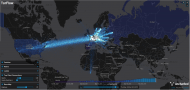
Yesterday, Kenneth Freeman posted a note to the tor-relays list drawing attention to a new resource called TorFlow. TorFlow is a beautiful visualisation of Tor network traffic around the world. It enables you to see where traffic is concentrated (Europe) and where there is almost none (Australasia). Having the data overlaid on a world map …
Permanent link to this article: https://baldric.net/2015/11/10/torflow/
Aug 20 2015
update to domain privacy
At the end of last month I noted that I had been receiving multiple emails to each of the proxy addresses listed for my newly registered “private” domains. Intriguingly, whilst I was receiving at least three or four such emails a week before I wrote about it, I have had precisely zero since. Probably coincidence, …
Permanent link to this article: https://baldric.net/2015/08/20/update-to-domain-privacy/
Aug 19 2015
why privacy matters
Last month my wife and I shared a holiday with a couple of old friends. We have known this couple since before we got married, indeed, they attended our wedding. We consider them close friends and enjoy their company. One evening in a pub in Yorkshire, we got to discussing privacy, the Snowden revelations, and …
Permanent link to this article: https://baldric.net/2015/08/19/why-privacy-matters/
Jul 30 2015
get your porn here
Dear Dave is at it again. Sometimes I worry about our PM’s priorities. Not content with his earlier insistence that UK ISPs must introduce “family friendly (read “porn”) filters”, our man in No 10 now wants to “see age restrictions put into place or these (i.e. “porn”) websites will face being shut down”. El Reg …
Permanent link to this article: https://baldric.net/2015/07/30/get-your-porn-here/
Jul 28 2015
domain privacy?
Over the past few months or so I have bought myself a bunch of new domain names (I collect ’em….). On some of those names I have chosen the option of “domain privacy” so that the whois record for the domain in question will show limited information to the world at large. I don’t often …
Permanent link to this article: https://baldric.net/2015/07/28/domain-privacy/
Jun 05 2015
why pay twice?
Yesterday’s Independent newspaper reports that HMG has let a contract with five companies to monitor social media such as twitter, facebook, and blogs for commentary on Goverment activity. The report says: “Under the terms of the deal five companies have been approved to keep an eye on Facebook, Twitter and blogs and provide daily reports …
Permanent link to this article: https://baldric.net/2015/06/05/why-pay-twice/
Jun 02 2015
de-encrypting trivia

Well, that didn’t last long. When I decided to force SSL as the default connection to trivia I had forgotten that it is syndicated via RSS on sites like planet alug. And of course as Brett Parker helpfully pointed out to me, self-signed certificates don’t always go down too well with RSS readers. He also …
Permanent link to this article: https://baldric.net/2015/06/02/de-encrypting-trivia/
Jun 01 2015
encrypting trivia
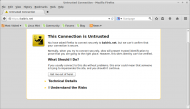
In my post of 8 May I said it was now time to encrypt much, much more of my everyday activity. One big, and obvious, hole in this policy decision was the fact that the public face of this blog itself has remained unencrypted since I first created it way back in 2006. Back in …
Permanent link to this article: https://baldric.net/2015/06/01/encrypting-trivia/
May 08 2015
back on topic
Theresa May hasn’t wasted any time. The Independent reports today that Ms May (Home Secretary in the coalition administration) has said that the new Tory administration will bring the Draft Communications Data Bill, previously blocked by the Liberal Democrats, back to the House of Commons with the intention of getting it passed into law. As …
Permanent link to this article: https://baldric.net/2015/05/08/back-on-topic/
Dec 13 2014
solidarity with the tor project
On Thursday 11 December, Roger Dingledine of the Tor project posted the following email to the “tor-talk” mail list (to which I am subscribed). I’d like to draw your attention to https://blog.torproject.org/blog/solidarity-against-online-harassment https://twitter.com/torproject/status/543154161236586496 One of our colleagues has been the target of a sustained campaign of harassment for the past several months. We have decided …
Permanent link to this article: https://baldric.net/2014/12/13/solidarity-with-the-tor-project/
Jul 28 2014
punctuation matters
There is a nice tweet over at @NSA_PR. It reads: We take your privacy, seriously. Beyond parody.
Permanent link to this article: https://baldric.net/2014/07/28/punctuation-matters/
Jul 21 2014
drip
I get my domestic ADSL connectivity from the rather excellent people at Andrews and Arnold. Here’s why. And this is the original reason I moved to them. They also happily take (and similarly reply to) GPG encrypted support questions. Good guys. Thoroughly recommended. Now can you /really/ see BT doing any of that? ‘thought not.
Permanent link to this article: https://baldric.net/2014/07/21/drip/
May 30 2014
a new app
My newspaper of choice, the Guardian, has for some time produced its own android (and iOS of course) app. I have often used the android app on my tablet to catch up on emerging news items at the end of the day. I also read the BBC news app for the same reason. Yesterday I …
Permanent link to this article: https://baldric.net/2014/05/30/a-new-app/
Apr 16 2014
nsa operation orchestra
In February of this year, Poul-Henning Kamp (a.k.a “PHK”) gave what now looks to be a peculiarly prescient presentation as the closing keynote to 2014’s FOSDEM. In the presentation (PDF), PHK posits an NSA operation called ORCHESTRA which is designed to undermine internet security through a series of “disinformation” or “misinformation”, or “misdirection” sub operations. …
Permanent link to this article: https://baldric.net/2014/04/16/nsa-operation-orchestra/
Apr 16 2014
more heartbleed
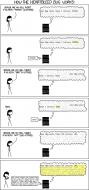
For any readers uncertain of exactly how the heartbleed vulberability in openssl might be exploitable, Sean Cassidy over at existential type has a good explanation. And if you find that difficult to follow, Randall Munroe over at xkcd covers it quite nicely. My thanks, and appreciation as always, to a great artist. Of course, Randall …
Permanent link to this article: https://baldric.net/2014/04/16/more-heartbleed/
Apr 16 2014
pulitzer guardian
The Guardian and the Washington Post have been jointly awarded the Pulitzer prize for public service for their reporting of Edward Snowden’s whistleblowing on the NSA’s surveillance activities. The Guardian reports: The Pulitzer committee praised the Guardian for its “revelation of widespread secret surveillance by the National Security Agency, helping through aggressive reporting to spark …
Permanent link to this article: https://baldric.net/2014/04/16/pulitzer-guardian/
Apr 15 2014
boot and nuke no more
I was contacted recently by a guy called Andy Beverley who wrote: Hope you don’t mind me contacting you about one of your old blog posts “what gives with dban”. Thought I’d let you know that I forked DBAN a while ago, and produced a standalone program (called nwipe) that will run on any Linux …
Permanent link to this article: https://baldric.net/2014/04/15/boot-and-nuke-no-more/
Feb 12 2014
checking client-side ssl/tls
At the tail end of last year I mentioned a couple of tools I had used in my testing of SSL/TLS certificates used for trivia itself and my mail server. However, that post concentrated on the server side certificates and ignored the security, or otherwise, offered by the browser’s configuration. It is important to know …
Permanent link to this article: https://baldric.net/2014/02/12/checking-client-side-ssltls/
Feb 12 2014
policy update
An exchange of emails with Mark over at bsdbox.co a day or so ago made me realise that my privacy policy needed updating. Not, I hasten to add, for any fundamental reason, but simply because a couple of the references in that policy were out of date. I have therefore amended it and version 0.2.0 …
Permanent link to this article: https://baldric.net/2014/02/12/policy-update/