Archive for the ‘psp’ Category

psp video revisited

Sunday, March 21st, 2010

I last posted about ripping DVDs to PSP format back in November 2007. Since then I have used a variety of different mechanisms to transcode my DVDs to the MP4 format preferred by my PSP. A couple of years ago I experimented with both winff and a command line front end to ffmpeg called handbrake. Neither were really as successful as I would have liked (though winff has improved over the past few years) so I usually fell back to the mencoder script that works for 95% of all the DVDs I buy.

I have continually upgraded the firmware on my PSP since 2007 so that I am now running version 6.20 (the latest as at today’s date). Somewhere between version 3.72 and now, sony decided to stop being so bloody minded about the format of video they were prepared to allow to run on the PSP. We are still effectively limited to mpeg-4/h.264 video wth AAC audio in an mp4 container, but the range of encoding bitrates and video resolutions is no longer as strictly limited as it was back in late 2007. So when going about converting all the DVDs I received for christmas and my last birthday and considering whether I should I move my viewing habits to take advantage of the power of my N900, I recently revisited my transcoding options.

Despite the attractiveness of the N900′s media player I concluded that it still makes sense to use the PSP for several reasons:- it works; the battery lasts for around 7 hours between charges; I have a huge investment in videos encoded to run on it; and most importantly, not using the the N900 as intensively as I use the PSP means that I know that my ‘phone will be charged enough to use as a ‘phone should I need it.

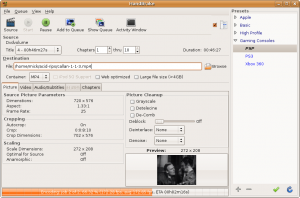
But whilst revisiting my options I discovered that the latest version of handbrake (0.9.4) now has a rather nice GUI and it will rip and encode to formats usable by both the PSP and a variety of other hand-held devices (notably apple’s iphone and ipod thingies) quite quickly and efficiently. Unfortunately for me, the latest version is only available as a .deb for ubuntu 9.10 and I am still using 8.04 LTS (because it suits me). A quick search for alternative builds led me to the ppa site for handbrake which gives builds up to version 0.9.3 for my version of ubuntu. See below:

image of handbrake gui

This version works so well on my system that I no longer have to use my mencoder script.

apple antipathy may be misplaced

Sunday, November 29th, 2009

Apparently the lastest release of the iPhone OS (v 3.1) has caused a few minor problems with WiFi and battery life. This has led El Reg to moan about the fact that you can’t downgrade the iPhone OS to an earlier version. I’m no great fan of Apple, but to be fair, this situation is not unique to them. Each time I update my PSP to the latest software release, I receive a warning that I cannot revert to the earlier version after upgrade. Not being an iPhone user, I don’t know whether you get a similar warning from Apple before the upgrade or not. But that aside, it does not strike me as unreasonable that Apple should prefer you to keep your OS as current as possible. Software upgrades are generally designed to fix bugs and/or introduce new features. If a particular upgrade has problems, then I would expect the supplier to fix those problems with a new release or a service pack. I would not expect them to recommend that you downgrade.

psp hardware and software specs

Sunday, January 13th, 2008

I have just stumbled upon a very good resource listing specifications of the hardware and software revisions for the PSP. I would have found this site most useful when I was researching how to format video for the psp last year.

The site is at www.edepot.com/reviews_sony_psp.html

update to ripping DVDs to a sony psp on linux

Sunday, November 25th, 2007

Since writing the entry below, I have discovered a much simpler way of ripping and transcoding DVDs – k9copy. I really should have noticed this earlier because I investigated k9copy when I was playing with dvd::rip and winFF as GUI tools for ripping. I had (stupidly) assumed that k9copy could only copy a DVD to either another DVD or to an ISO file for later burning (admittedly useful if shrinking a DVD from around 9 Gig to under 5 Gig as is commonly required). My only excuse here is that the drop down menu options offered for “ouput device” only give the names of your optical drives or “ISO image”.

However, I went back to k9copy a few days ago when I was trying to rip a particularly difficult DVD which seemed to be faulty. The disk in question would sometimes read, and at other times fail. So my thinking went along the lines of “I’ll try copying to an ISO so that I can loop mount it and then transcode”. When I opened k9copy to do so I noticed that there was an option to create an MPEG 4 file – moreover there were a bunch of preset options for MPEG 4 encoding in the “settings” menu. I tested ripping and transcoding to MPEG 4 (DIVX 4/5) in an avi container and sure enough, it worked fine and played back perfectly using Totem/Xine/VLC/Mplayer. There is no preset for PSP format, but k9copy allows you to add video and audio codec options to pass to mencode. Result!

I created new video and audio entries called “PSP” and “PSP audio” respectively and I now have a simple, all-in-one GUI for selecting, previewing, ripping and encoding to a format usable on my PSP.

I have documented this (with some screenshots) at
ripping and encoding a dvd to psp format using k9copy

I considered editing the earlier post to reflect this new discovery, but decided to leave it as is because the bash script might still be useful to someone. Certainly I use it when batch ripping several tracks (such as is common on TV series compilation disks) from a single disk. The script can be called from another script which just loops through the titles – e.g for a disk with 4 episodes of a programme called Dr Who, something like:

#!/bin/bash
#
for i in 1 2 3 4
do
./psp-encode.sh $i dr-who-$i
done

would do fine.

ripping DVDs to a sony psp on linux

Sunday, November 4th, 2007

I spend a lot of time on trains – I mean a /lot/ of time. My daily commute amounts to around 6 hours in total each day. Of that, at least 4 hours is spent sitting on a train avoiding listening to the cacophony of irritating chunterers and morons on mobiles. The worst period is first thing in the morning when silence is supposed to reign. The regulars know the rules. No chuntering. The most that should happen is a “good morning”. After that, silence. In the morning I need to sleep on the train simply to stay sane. In order to mute the noise I wear earplugs.

Coming home is different. Most people are awake and the ambient noise level is such that sleeping isn’t an option. With that level of noise I can’t concentrate properly to read so for some years I have listened to music and (latterly) watched DVDs. I find that with proper full insertion earphones I can shut out the rest of the world enough to allow me to start to relax and unwind sufficiently that I can arrive home in a mood which won’t involve me shouting at anyone. I now have a huge collection of DVDs (Christmas present? How about the complete series of the first Star Trek, The Outer Limits etc.)

But, DVDs plus laptop are bulky and heavy. For a while I tried a portable DVD player but the battery life is poor and, again it’s pretty bulky when you add a collection of DVDs. Then a colleague suggested a Sony PSP. He said that he could rip 3-4 DVDs to one 2 Gig memory stick and battery life ran to about 7 hours. Neat. I checked out my son’s PSP and found that the screen resolution was pretty good so I invested in one of my own to play with. (For some reason my son wasn’t keen on letting me have his for any length of time).

Because I use Linux, my colleague’s advice on ripping to PSP format wasn’t helpful. Google is your friend in such circumstances. I quickly discovered that Sony seem to have been awkward in the format they require for MPGE4 video on memory sticks. The PSP is also fussy about screen resolution and audio and video bitrates. I also found a lot of conflicting (and out of date) advice about where to store the movies once ripped. I guess this is largely because the memory stick file system format has changed since version 2.xx of the firmware (mine is at the latest 3.72, though I started at 3.30). In current firmware revisions (from 3.30 onwards at least) videos must simply be stored in the directory called “video” on the memory stick. The name you give to the file is the name that shows up on screen in the PSP.

The PSP manual says that the maximum supported video bit rate is 768kbps. The native screen resolution is supposedly 480 x 272 with support for 720 x 480 and 480 x 352 available for MPEG-4 AVC(H.264) video Main Profile (AVC CABAC) files since firmware v 3.30. However, I have never successfully /reliably/ converted to resolutions better than 368 x 208 and 320 x 240 using MPEG 4 video. I have had some success at higher resolutions using an h264 codec, but the transcoding process was slow and complex involving ripping from DVD to one format then transcoding again to h264. Life is too short. All my ripping is now done at 320 x 240 for the simple reason that it works consistently for any aspect ratio movie, gives good quality and the output can be resized reliably by the PSP itself (the PSP has several screen scaling modes available – original, normal, full screen and zoom). A resolution of 368 x 208 also works well, particularly for wide screen movies, but the output shows a black band at the top and bottom of the screen and it is not possible to zoom to fill.

Many of my early attempts at ripping and transcoding ended less than successfully. I’ve used transcode (www.transcoding.org/cgi-bin/transcode) in the past, together with dvd::rip (www.exit1.org/dvdrip) but I find transcode very slow and I couldn’t always get a successful conversion. So I changed to using MEncoder with ffmpeg. Most distros will have these installed as standard. If not installed, then your first port of call should be your distro repository, thereafter, try www.mplayerhq.hu for MPlayer/MEnecoder and ffmpeg.mplayerhq.hu for the codec.

The MPlayer site itself gives advice on how to rip DVD to a format usable on your PSP at:
www.mplayerhq.hu/DOCS/HTML/en/menc-feat-handheld-psp.html.

There they say:

———————————————————————-

“13.4 Encoding to Sony PSP video format

MEncoder supports encoding to Sony PSP’s video format, but, depending on the revision of the PSP software, the constraints may differ. You should be safe if you respect the following constraints:

- Bitrate: it should not exceed 1500kbps, however, past versions supported pretty much any bitrate as long as the header claimed it was not too high.

- Dimensions: the width and height of the PSP video should be multiples of 16, and the product width * height must be <= 64000. Under some circumstances, it may be possible for the PSP to play higher resolutions.

- Audio: its samplerate should be 24kHz for MPEG-4 videos, and 48kHz for H.264.

Example 13.4. encode for PSP

mencoder -ofps 30000/1001 -af lavcresample=24000 -vf harddup -of lavf -oac lavc -ovc lavc -lavcopts aglobal=1:vglobal=1:vcodec=mpeg4:acodec=aac -lavfopts format=psp input.video -o output.psp

Note that you can set the title of the video with -info name=MovieTitle."

--------------------------------------------------------------------------

Using a variant of that command line in a bash script I find that I can get a standard 2 hour movie down to around 350-550 MB with excellent resolution and audio quality. This means that I can get around 4 movies on a 2 Gig stick. Battery life runs to around 7.5 hours when running off the stick (and not using the UMD).

Note that I scale to 320x240 and specify the language as english ("alang-en") just to ensure that I don't get some other language as the audio output - german seems a popular default in my experience. You will need to ensure that your dvd device is correctly specified (mine is /dev/hda below). The track number is critical because you only want to transcode the main DVD track (usually the longest). The quickest way to discover this is to use a neat little util called lsdvd written by Chris Phillips and available from untrepid.com/acidrip/lsdvd.html. Chris has also written a really good graphical tool called AcidRip which acts as a front end to MEncoder/MPlayer. Note that I use “threads=2″ as one of the arguments to lavcopts. This is because I use a dual core processor and the ffmpeg libraries are capable of using both processors. The default is single threading.

My script is as follows:

#!/bin/bash
#
# script to encode DVD to MPEG4 video for PSP
#
# $1 = track number, $2 = title
#
mencoder dvd://$1 -dvd-device /dev/hda -alang en -oac lavc -ovc lavc -of lavf -lavcopts threads=2:aglobal=1:vglobal=1:
vcodec=mpeg4:mbd=2:trell:autoaspect:vbitrate=500:acodec=aac -af volume=10,lavcresample=24000 -vf scale=320:240,harddup -lavfopts format=psp:i_certify_that_my_video_stream_does_not_use_b_frames -o $2.mp4

# end of script

[Update note added on 6 June 2008. Since writing this post, both mencoder and ffmpeg have been updated so that the above script will not work without modification. In particular, the "i_certify...." option is no longer supported (or necessary) and the "aac" codec has been supplanted by "libfaac". So the new script should look like this:

#!/bin/bash
#
# script to encode DVD to MPEG4 video for PSP
#
# $1 = track number, $2 = title
#
mencoder dvd://$1 -dvd-device /dev/hda -alang en -oac lavc -ovc lavc -of lavf -lavcopts threads=2:aglobal=1:vglobal=1:
vcodec=mpeg4:mbd=2:trell:autoaspect:vbitrate=500:acodec=libfaac -af volume=10,lavcresample=24000 -vf scale=320:240,harddup -lavfopts format=psp -o $2.mp4
#

End of update note.]

I have also discovered a really good graphical frontend to ffmpeg called winFF (available from www.bigmatt.com). That utility uses ffmpeg to transcode from one file format to another. The nice thing is that it allows you to define a set of command line parameters to pass to ffmpeg in user friendly format. I successfully used this nice GUI to convert AVI packaged files to MPEG4 and h264 encoded files for my PSP. The biggest drawback for most people is that it doesn’t rip from DVD, it only transcodes.

For encoding to MP4 I used:

“-threads 2 -f psp -vcodec mpeg4 -acodec aac -b 500 -ar 24000 -ab 96 -s 368×208 -aspect 16:9″

and set the output file expension to mp4

For encoding to h264 I used:

“-threads 2 -f psp -vcodec h264 -acodec aac -b 500 -ar 24000 -ab 96 -s 720×480 -aspect 16:9″

and set the output file extension to mp4

Note that this is the only way I have successfully managed to get a resolution of 720×480. Note also that the audio bit rate is 96 kbits. Anything higher than that is a waste of time (and space).

As for actually getting the files onto the PSP, it couldn’t be simpler. Just connect the PSP to your Linux box with a USB cable, select “USB connection” from the PSP menu and the device will appear on your desktop as any other removable USB disk. Copy the files you have ripped to the PSP directory called “VIDEO” and away you go.

Of course, all of this assumes that copying DVDs is legal in your country of residence. I am not a lawyer and you must decide for yourself whether following these (purely hypothetical) instructions is legal.