Archive for October, 2009

call me by name, or call me by value

Thursday, October 29th, 2009

The old saw about “real” programmers versus the rest (known as “quiche eaters”) was originally summarised beautifully in the classic letter to the editor of Datamation in July 1983 entitled “real programmers don’t use pascal”.

Similar religious (i.e. irrational, but deeply held) positions are taken around various other “lifestyle” choices, such as the equally classic emacs vs vi argument. (For the record I’m in the vi camp – you know it makes sense). So I was delighted to stumble across this from XKCD.

real_programmers_cartoon

Again, my thanks to XKCD.

handbags?

Wednesday, October 28th, 2009

It would appear that I may have been unnecessarily concerned about the accuracy of the profiling data held on me by the commercial sites I use. In my inbox today I found the following email from Amazon:

“As a valued Amazon.co.uk customer, we thought you might be interested in visiting our website dedicated to shoes and handbags, Javari.co.uk.

Javari.co.uk offers Free One-Day Delivery, Free Returns, and a 100% Price Match Guarantee.

Welcome to Javari.co.uk”

I don’t know whether to feel reassured at Amazon’s failure to understand me or disappointed that the considerable resource they have at their disposal can get me so wrong.

logrotate weirdness in debian etch

Sunday, October 18th, 2009

I have two VPSs, both running debian. One runs lenny, the other runs etch. The older etch install runs fine, and is much as the supplier delivered it. Until now I have not had cause to consider the need to upgrade the etch install to lenny because it “just worked”. But today I noticed for the first time a very odd difference between the two machines. A difference which had me scratching my head, and reading too many man entries, for some long time before I found the answer.

For reasons I don’t need to go into, I log all policy drops in my iptables config to a file called “/var/log/firewall”. This file is (supposedly) rotated weekly. The logrotate and cron entries on both machines are identical.. The entry in “/etc/logrotate.d/firewall” looks like this:

/var/log/firewall {
rotate 6
weekly
mail logger@baldric.net
compress
missingok
notifempty
}

The (standard) file “/etc/logrotate.conf” simply calls the firewall logrotate file out of the included directory “/etc/logrotate.d”. The “/etc/cron.daily/logrotate” file (which calls the logrotate script) is also standard and simply says:

#!/bin/sh

test -x /usr/sbin/logrotate || exit 0
/usr/sbin/logrotate /etc/logrotate.conf

and the (again standard) crontab file says:

# /etc/crontab: system-wide crontab
# Unlike any other crontab you don’t have to run the `crontab’
# command to install the new version when you edit this file
# and files in /etc/cron.d. These files also have username fields,
# that none of the other crontabs do.

SHELL=/bin/sh
PATH=/usr/local/sbin:/usr/local/bin:/sbin:/bin:/usr/sbin:/usr/bin

# m h dom mon dow user command
54 * * * * root cd / && run-parts –report /etc/cron.hourly
55 4 * * * root test -x /usr/sbin/anacron || ( cd / && run-parts –report /etc/cron.daily )
36 5 * * 7 root test -x /usr/sbin/anacron || ( cd / && run-parts –report /etc/cron.weekly )
3 3 5 * * root test -x /usr/sbin/anacron || ( cd / && run-parts –report /etc/cron.monthly )
#

So far so simple, and you would expect the file “/var/log.firewall” to be rotated once a week at 04.55 on a sunday morning. Wouldn’t you.

Well, on lenny, you’d be right. But on the etch machine the file was rotated daily at a time completely unrelated to the crontab entry. It turns out that there is a bug in the way etch handles logrotation because syslog doesn’t use logrotate and overrides the logrotatiion entries run out of cron. I found this after much searching (and swearing).

See the bug report at bugs.debian.org and this entry which pointed me there.

I love standards.

where has my money gone?

Thursday, October 15th, 2009

Like most ‘net users I know these days, I conduct most of my financial transactions on-line. But on-line banking is a high risk activity, particularly if you use the “default” OS and browser combination to be found on most PCs. I don’t, but that doesn’t make me invulnerable, just a slightly harder target. So attempts by the banks to make it harder for the bad guys to filch my money are welcome. Many banks seem to be taking the two factor authentication route by supplying their customers with a hardware token of some kind to be used in conjunction with the traditional UID/password.

I have just logged on to my bank to be greeted with a message that they will shortly be introducing a one-time password system. Apparently this system requires me to register my mobile phone number with the bank. Thereafter, for certain “high risk” transactions (such as setting up a new payment to an external account) in addition to requiring my normal UID/password, the bank will send a one-time password to my moblle which I will have to play back to the bank via the web site before the transaction will be authorised. Sounds reasonable? Maybe. Maybe not. I can see some flaws – not least the obvious one that I have to have a mobile phone (probably not an unreasonable assumption) and that I have to be prepared to register that with the bank (slightly less reasonable). But my biggest concern is that this approach fails to take account of the fact that “people do dumb things” (TM).

The bank’s FAQ about the new system says: “We have decided to use your mobile phone for extra security so there is no need to carry around a card reader to use e-banking. This also provides extra security as it is unlikely a fraudster will be able to capture both your internet log on credentials as well as your mobile phone.”

I have a problem with that assumption. I know a lot of otherwise very smart people who use their “smart” phones as a central repository of a huge amount of difficult to remember personal information. These days it is very rare for anyone to actually even remember a friend’s ‘phone number. Why bother – just scroll down to “john at work” and press call. These same people store names, addresses, birthday reminders, and yes, passwords for the umpteen web services they use, on the same device. That ‘phone may even be used to log on to the website that requires the password. Indeed, it is entirely plausible that many people will use their ‘phone to log on to their bank when out and about simply to make exactly the kind of transaction my bank deems “high risk” , i.e. to transfer funds from one acccount to another so that they can make a cash withdrawal from an ATM without incurring charges.

“it is unlikely a fraudster will be able to capture both your internet log on credentials as well as your mobile phone.”

How many mobiles are lost or stolen every day?

debian on a DNS-313

Saturday, October 3rd, 2009

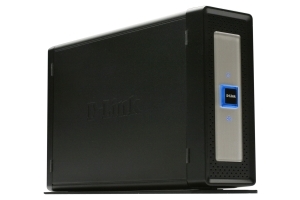
I bought another new toy last week – a D-Link DNS 313 NAS.

D-Link DNS-313

D-Link DNS-313

Actually, this was a mistake because what I really wanted was the DNS-323. I just wasn’t careful enough at the time. Quite apart from having space for two 3.5″ SATA hard drives instead of just one, the 323 is a very different beast to its smaller (and much cheaper) sibling.

Martin Michlmayr has a nice guide to installing debian on a 323. Given that the 323 has a faster processor and more RAM than a slug and it can take two internal SATA disks rather than just the external USBs it looks like an attractive option for a new debian based server. Pity then that I bought the wrong one. My excuse is that I thought the only difference was in the disk capacity and I was prepared to settle for just 1TB of store. The (normally reliable) owner of the shop where I bought the beast was also adamant that the disk capacity was the only difference between the two devices. I should have known better than to succumb to what was essentially an impulse buy when I wasn’t really intending to buy a new NAS at the time (I was in the shop for something else and picked up the 313 because I recalled reading Martin’s pages recently).

Once I got the 313 home of course and checked the specs it looked as if I would be stuck with the D-Link supplied OS. However, a bit of searching turned up the DSM-G600, DNS-323 and TS-I300 Hack Forum which has a series of articles on installing debian on a 313 (despite the forum title). A forum contributor called “CharminBaer” has put together a nice tarball of debian lenny which allows the user to replace the D-Link OS without actually reflashing the device. This means that the original bootloader is retained but the device boots into the replacement system on disk. The nicest part of this installation method is that there is almost no risk of bricking the device because the installation simply entails copying the tarball onto the disk over a USB connection, extracting the files and then booting into a shiny new Lenny install. Result.

The tarball can be found here, and the installation instructions are here.

Many thanks to “CharminBaer”.

debonaras demise?

Saturday, October 3rd, 2009

Sadly it seems that the debonaras wiki is no more. Rod Whitby had done some excellent work in pulling together a site which consolidated useful information about low cost network storage devices (alternatives to the slug) which could be made to run Debian. Unfortunately the site was a continual target for wiki spam bots and malcontents and it obviously became high maintenance. About a year ago I corresponded with Rod about the spam activity after he introduced password controlled access to some of the main target pages. I even assisted in moderation and maintenance of the site for a while when it became clear that Rod was getting fed up of the work load for no obvious benefit. It now looks as if he has decided to let the domain lapse after all.