Archive for February, 2010

from slug to plug

Sunday, February 28th, 2010

Well this took rather longer than expected. I intended to write about my latest toy much earlier than this, but several things got in the way – more of which later.

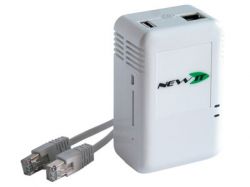
About three or four weeks ago I bought myself a new sheevaplug.

image of sheevaplug

The plug has been on sale in the US for some time, but UK shipping costs added significantly to $99 US retail price. Recently however, a UK supplier (Newit) has started stocking and selling the plugs over here – and at very good prices too. My plug arrived within three days of order and I can thoroughly recommend Newit. The owner, one Jason King no less (fans of 1970′s TV will recognise the name), kept me informed of progress from the time I placed the order to the time it was shipped. He even took the trouble to email me after shipping to check that I had received it OK. Nice touch, even if it was automated.

Looking much like a standard “wall wart” power supply typically attached to an external disk, the plug is actually quite chunky, but it will still fit comfortably in the palm of your hand. Inside that little box though there is enough computing power to make a slug owner more than happy. The processor is a 1.2 GHz Marvell Kirkwood ARM-compatible device and it is coupled with 512MB SDRAM and 512MB Flash memory. Compare that to the poor old slug’s 266 MHz processor and 32 MB of flash and you can see why I’d be interested – particularly since the plug can run debian (and Martin Michlmayr has again provided a tarball and instructions to help you out.

The plugs come in a variety of flavours, but all offer at least one USB 2.0 port, a mini usb serial port, gigabit ethernet and an SDHC slot. This means that debian (or another debian based OS such as Ubuntu) can be installed either to the internal flash or to one of the external storage media available. Newit ship the plugs in various configurations and will happily sell you a device fully prepared with debian (either Lenny or Squeeze according to your taste) on SD card to go with the standard Ubuntu 9.04 in flash. Personally I chose to install debian myself, so I bought the base model. (No, I’m not a cheapskate, I just prefer to play. Where’s the fun in buying stuff that “just works”?)

Given that Martin’s instructions suggest that installing to USB disk can be problematic, and that I have debian lenny on my slugs (and had a spare 4 Gig SDHC card lying around) I chose to use his tarball to install lenny to my SDHC card. Firstly I formatted the card (via a a USB mounted card reader) as below:

/dev/sdb1 512 Meg bootable
/dev/sdb2 2.25 Gig
/dev/sdb3 1024 Meg swap

(note that the plug will see these devices as “/dev/mmcblk0pX” when the card is loaded. The “/dev/sdbX” layout simply reflects the fact that I was using a USB mounted card reader on my PC. )

I then downloaded and installed Martin’s lenny tarball to the newly formatted card and as instructed edited the /etc/fstab to match my installation. Martin’s fstab file is below:

# /etc/fstab: static file system information.
#
#
proc /proc proc defaults 0 0
# Boot from USB:
/dev/sda2 / ext2 errors=remount-ro 0 1
/dev/sda1 /boot ext2 defaults 0 1
/dev/sda3 none swap sw 0 0
# Boot from SD/MMC:
#/dev/mmcblk0p2 / ext2 errors=remount-ro 0 1
#/dev/mmcblk0p1 boot ext2 defaults 0 1
#/dev/mmcblk0p3 none swap sw 0 0

As you can see it defaults to assuming a USB attached device. You need to comment out the USB boot entries and uncomment the SD/MMC entries if. like me, you are intending to boot from SD card. At this stage I also edited “/etc/network/interfaces” to change the eth0 interface from dhcp to static (to suit my network) and I changed “/etc/resolv.conf” because the default includes references to cyrius.com and a local IP address for DNS.

Before we can boot from the SD card, we have to make a few changes to the uboot boot loader configuration to stop it using the default OS on internal flash (where the factory installed Ubuntu resides). Again, Martin’s instructions are helpful here but he points to the openplug.org wiki for instructions in setting up the necessary serial connection to the plug. On my PC (running Ubuntu 8.04 LTS) I got no ttyUSB devices by default and “modprobe usbserial” did not work but “modprobe ftdi_sio vendor=0x9e88 product=0x9e8f” did work for me.

Now open a TTY session using cu thusly “cu -s 115200 -l /dev/ttyUSB1” – don’t use putty on linux, it doesn’t allow cut and paste which can be very useful if you are following on-line instructions (of course it helps if you cut and paste the right instructions). I found that booting is too fast if you have to switch on the plug and then return to a keyboard so I recommend simply leaving the terminal session open and resetting the plug with a pin or paper clip. Hit any key to interrupt the boot session, then follow Martin’s instructions for editing the uboot environment.

My plug was running v 3.4.16 of uboot, so at first I used version 3.4.27 (downloaded from plugcomputer.org) and loaded that via tftp as described by Martin, But this turmed out to be a mistake because my plug failed to boot thereafter. I got the following error message via the serial console:

## Booting image at 00400000 …
Image Name: Debian kernel
Created: 2009-11-23 17:25:02 UTC
Image Type: ARM Linux Kernel Image (uncompressed)
Data Size: 1820320 Bytes = 1.7 MB
Load Address: 00008000
Entry Point: 00008000
Verifying Checksum … Bad Data CRC

Some searching suggested that the uboot image was probably the problem and that reverting to v3.4.19 would solve this. So I downloaded 3.4.19 from “vioan’s” post “#6 on: November 16, 2009, 03:21:34 PM” at the plugcomputer.org forum and reflashed the plug with that image. Success – my plug now booted into debian lenny. Tidy up, update the OS and add a normal user as recommended and we’re ready to go.

My plug was intended to replace the slug I was using as my local apt-mirror. That mirror is now fairly large because I have a mix of 32 and 64 bit ubuntus (of varying vintages) and 386 and ARM versions of debian. I therefore recycled an unused 500 gig lacie USB disk and mounted that as /home2 (originally as /home, but I soon changed that when I wanted to unmount it frequently and then lost my home directory….) Copying the apt-mirror (175 Gig) over the network from my old slug was clearly going to take forever – high speed networking is not the slug’s forte, so I mounted both the slug and the plug’s disks locally on my PC and copied the files over USB – much faster. It was here that I discovered why the old lacie disk (a “designed by porsche” aluminium coated beast) was lying idle. I’d forgotten that it sounded like a harrier jump jet on take off when in use. I put up with that for a week – just long enough to get me to a free weekend when I could rebuild the old slug (now used as just an NTP server and the webcam) to boot from a 4 gig USB stick so that I could recycle its disk onto the plug. I’ve just finished doing that.

One other problem I found with the plug which caused me much head scratching (and delayed my writing this as I noted above) was that it consistently failed to boot back into my debian install after a “reboot” or “shutdown -r” – I had to power cycle the device to get it to boot properly. I spent some time this weekend with the serial port connected before I noticed (using “printenv” at the uboot prompt) that I had mixed up the uboot environment variables printed on Martin’s site. I had actually copied part of the instructions for the USB boot variant instead of the correct ones for the SD card boot. Sometimes “cut and paste” can be a mistake.

homeopathy

Friday, February 26th, 2010

I can’t recall how I got there, but this made me laugh enough to want to share it.

isp shenanigans

Saturday, February 20th, 2010

I have recently been off-line. And I am less than happy about the reasons.

My ISP recently informed me that it was changing it’s back end provider from Entanet to Vispa. Like many small ISPs, my provider does not have any real infrastructure of its own, it simply repackages services provided by a wholesaler who does have the necessary infrastructure in a process commonly called “whitelabelling”. This whitelabel approach is particularly common amongst providers of webspace and it normally works fine. Amongst the smaller ISPs there are many who are simply Entanet resellers. And until recently Entanet had a good name for pretty solid service. Well not any more.

I had not noticed any particular problems and was slightly surprised to hear from my ISP that they were unhappy with the service they were getting from Entanet. Apparently there had been frequent network outages for many of their customers and so they had chosen a new provider and were notifying their customers of impending moves, Of course this would mean some local configuration changes so customers were advised in advance of those changes and the dates for action. Apart from preparing to change the ADSL login details on my router, in my case I also had to ensure that my SSH and other login details on various external services I have or use were modified to accept the new fixed IP address assigned to my router (I tend to lock down such services so that they only accept connections from my IP address, not foolproof I know, but it all helps).

In the migration advice letter, my ISP advised its customers to set up new direct debit arrangements for Vispa and cancel the existing ones to Entanet. That letter advised that any over or under charge either way during transition would be sorted out between the providers. So I did as I was advised and waited for the big day (approximately 10 days away). Big mistake.

About a week before the date of transition I found my web traffic intercepted and blocked by Entanet with the message “Your account has been blocked. Please contact your internet service provider”. This blockage only occurred on web traffic (my email collection over POP3S and IMAPS continued to work, as did ICMP echo requests and ssh connections out). This action actually pissed me off even more than I would have been if Entanet had completely cut my connection. It also, incidentally, betrayed the fact that they were using a transparent web proxy on the connection – not something that makes me very happy. But simply blocking web traffic was obviously designed to annoy me and make me contact my ISP and strongly suggests to me that Entanet were usnsure of their legal right to cut me off completely. Further, in my view, intercepting my web traffic in this way may actually have been illegal.

Interestingly, even http traffic aimed inbound to my ADSL line (where I run a webcam on one of my slugs) was similarly intercepted as is evidenced by this link from changedetection.com. Obviously, the imposition of the message from Entanet was picked up by changedetection as an actual change to that web page.

So I emailed Entanet and my ISP, pointing out that my contract was with them and not Entanet and told them to sort it out between themselves. I, as a customer, did not expect to be penalised simply because my ISP had decided to change its wholesaler. Meanwhile, I decided to bypass Entanet’s pathetic and hugely irritating web block by tunneling out to a proxy of my own. Of course I could have used my existing tor connection, but that is not always as fast as I would like, particularly at peak web usage hours, so I set up a new proxy on another of my VPSs using tinyproxy, listening on localhost 8118 (the same as privoxy on my tor node). I then set up an ssh listener on my local machine and set firefox to use that listener as its proxy – again, much as I had for tor. Bingo. Stuff you Entanet.

Unfortunately, it did not stop there. Entanet’s rather arrogant response to my email was to insist that I re-establish a direct debit with them for the few days remaining before the changeover (despite them having had my payment in advance for the month in question). No way, so I ignored this request only to find that Entanet then throttled my connection to 0.02 Mb/s – see the speedtest result below.

speedtest image

speedtest image

This sort of speed is just about usable for text only email, but is absolutely useless for much else. Now I had originally been given two separate dates for the changeover by my ISP, so in a fit of over enthusiastic optimism on my part, I tried to convince myself that the earlier (later corrected) date given was the correct one and so I reconfigured my router in the hope it would connect to Vispa, No deal. Worse, when I then tried to fall back to the (pitiful) Entanet connection, I found it blocked completely. I was thus without a connection for some four days (including a very long weekend).

So far my new connection looks good. But apart from my disgust with Entanet, I have not been overly impressed with the support I have received from my ISP during these problems. I’ll keep an eye on things – I may yet move of my own volition.

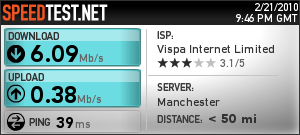
[Addendum] just by way of comparison, the test result below is what I expect my connection speed to look like. Test run at around 21.45 on Sunday 21 February 2010.

speedtest image

That’s a bit better. Note however that this test was direct from Vispa’s network rather than through my ssh tunnel.